

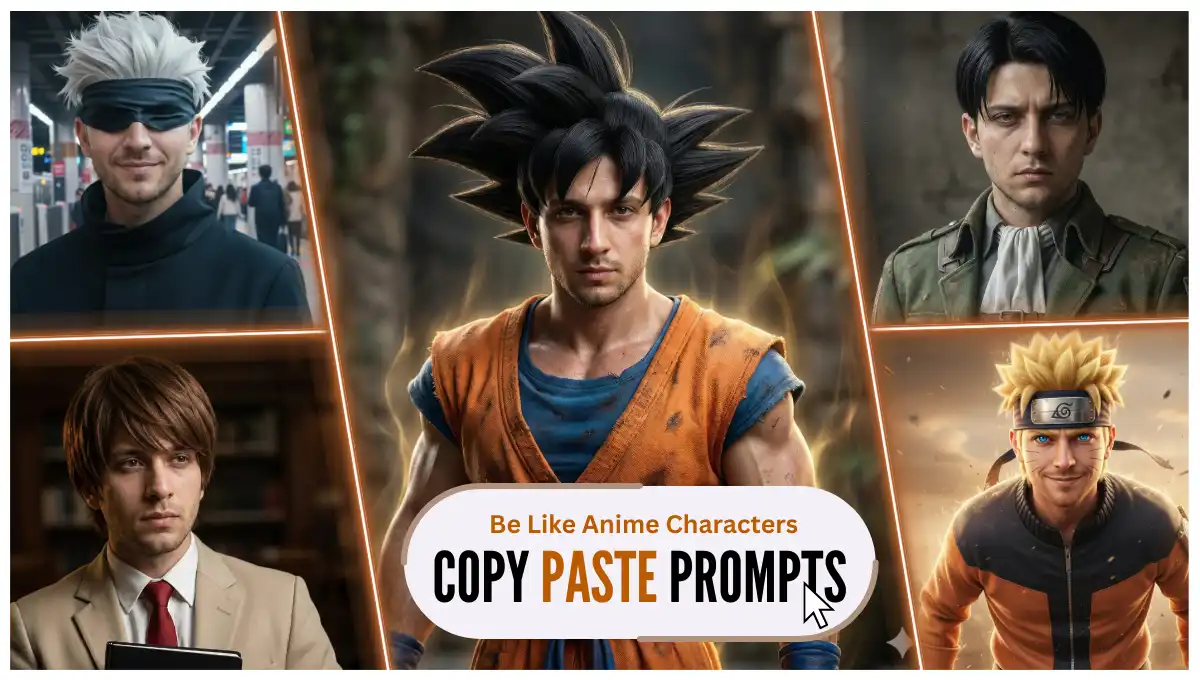
We weren’t yet finished generating images with Rehman Dakait’s character using Gemini, a new trend shown up, and this it actually insane.
So, can you guess what it is? It’s coming all over from Anime, one of the most famous series all over the world. Yes, the world of Goku, Saitama, Hitachi and Gojo.
With the help of AI, you can now generate photoreal and ultra detailed Anime images of yourself which will look so real that until you don’t show Gemini’s watermark, no one gonna believe it’s made up.
I have crafted 8 fresh and unique prompts for you guys. Neither copied, nor borrowed, all fresh and ready to copy and paste. Just pick whichever you like, and transform yourself.
Okay, enough talk, let’s get started. And in the bottom, you will get a step by step tutorial as well if you don’t know how and where to use these prompts.
Key Takeaways:
- There are many good image generating AI tools out there, but you know, Nano Banana Pro actually gives insane outputs. Will be using it through Gemini. And if you want to claim Gemini Pro for 18 months, all for free, read this tutorial where I have explained it step by step.
- All you need to have is one clear and good quality photo of yours, a prompt which you can pick from the following list, and few seconds for the generation, and you are all done.
- As I always say, sometimes you don’t get the desired results at first attempt. Just try again without modifying or doing any changes with the prompt, as I have tested them before listing here many times.
Prompts with Outputs:
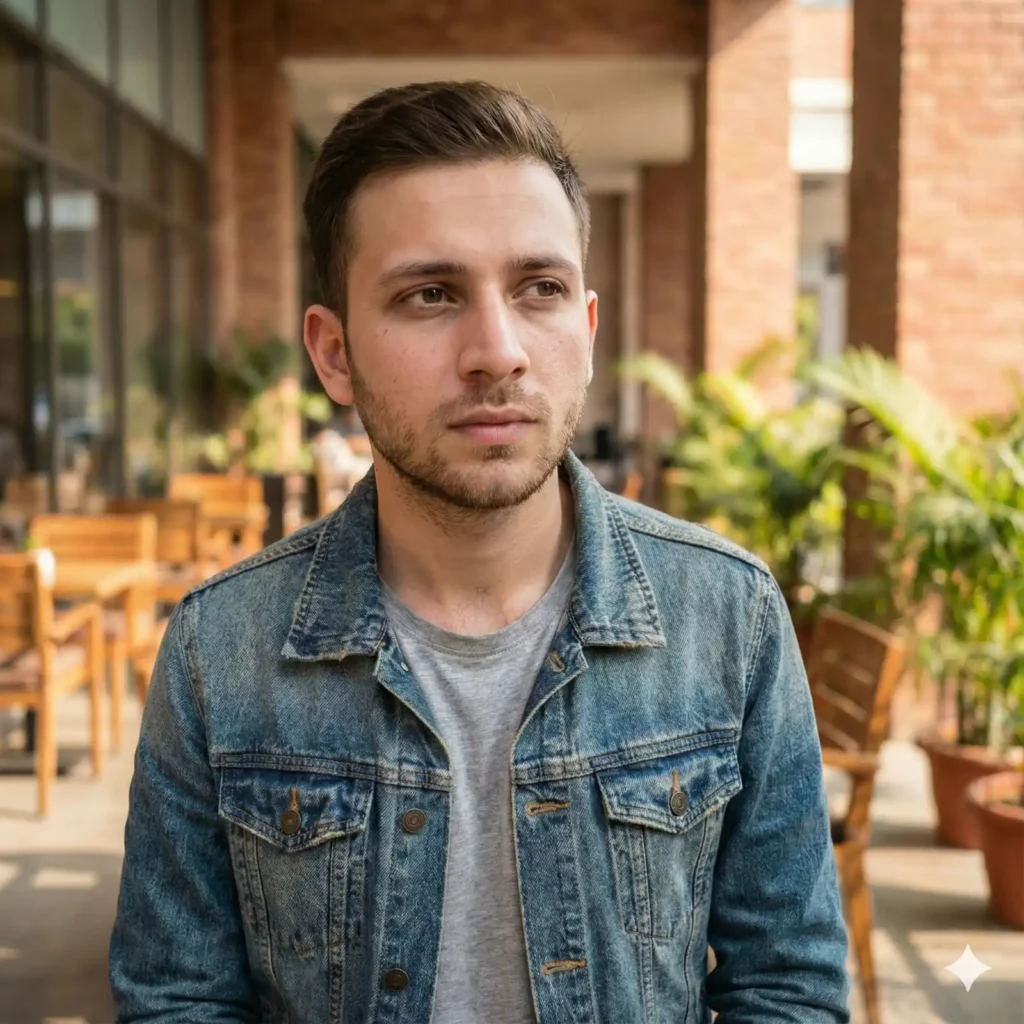
Before getting started, have a look at the model we are using. The person in above image is Jack, and he is our model. And for your kind information, he too is generated by AI. Now, let’s have a look on the prompts and their output images.
1. Son Goku
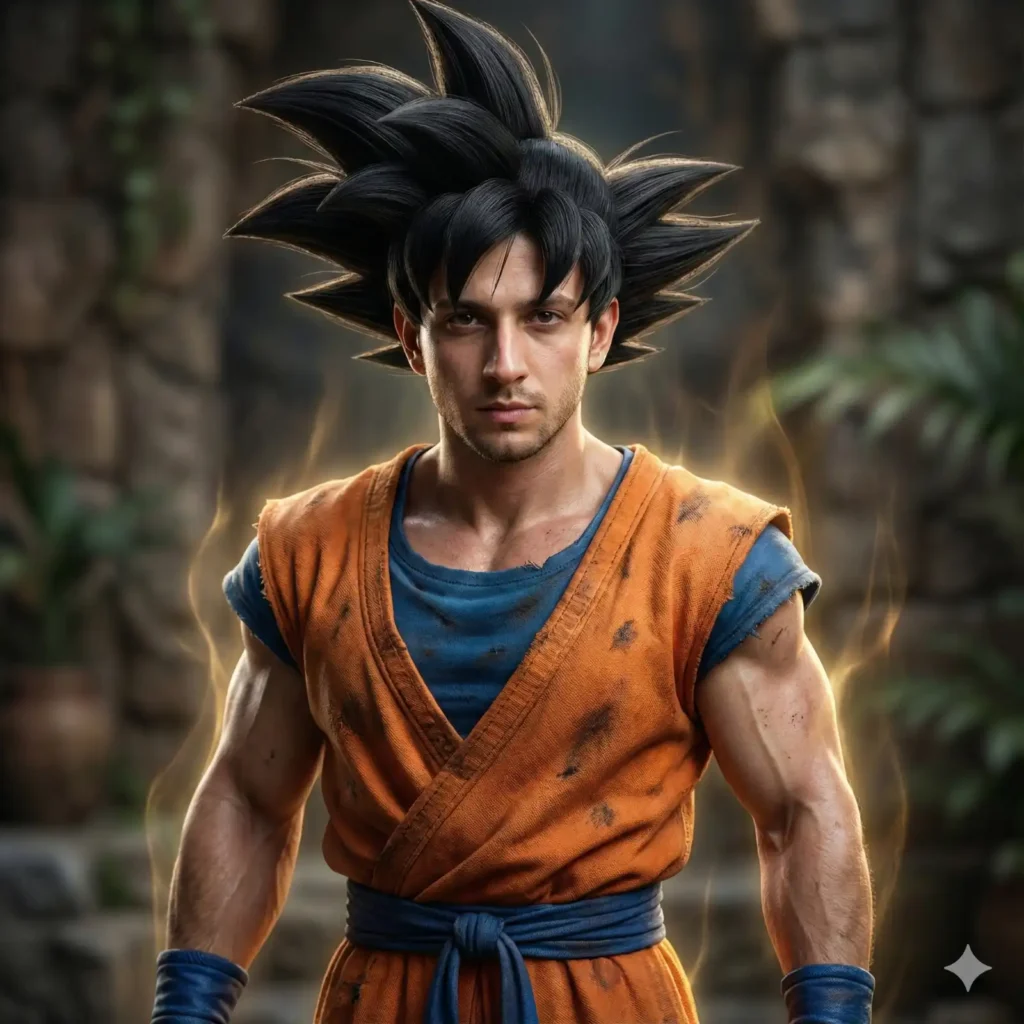
Copy Prompt: Transform the person in the uploaded image into a hyper-realistic, real-life version of Son Goku from Dragon Ball. Maintain the person’s exact facial structure, skin texture, identity, and expression, but re-imagine them as if they were Goku in real life, with full cinematic realism and ultra-detailed rendering. Give them Goku’s iconic gravity-defying, thick, spiked black hair with realistic strands, volume, and natural shading. Create the classic orange martial arts gi with deep fabric texture, stitching, shadows, and battle-worn realism. Add the blue undershirt, blue wristbands, and blue boots with accurate material detail. Ensure the physique is athletic, powerful, and natural — not exaggerated — with realistic muscle definition and lifelike skin pores, micro-details, and accurate anatomical lighting. Apply dramatic, high-end cinematic lighting with soft rim-lights and strong directional highlights to emphasize form. Include subtle Super Saiyan-like energy aura as a faint glow around the body — realistic, not cartoonish — blending naturally into the environment. The final image should look like a real human who embodies Goku, photographed with a professional ultra-high-resolution camera. No cartoon effects, no anime shading, no 3D game character look. Aim for photorealism on the level of top-tier studio character portraits. Keywords: hyper-realistic, ultra-detailed skin, cinematic lighting, realistic hair physics, museum-grade portrait, 8K, dramatic composition, realistic clothing texture, lifelike aura, real-world Goku interpretation.
2. Levi Ackerman
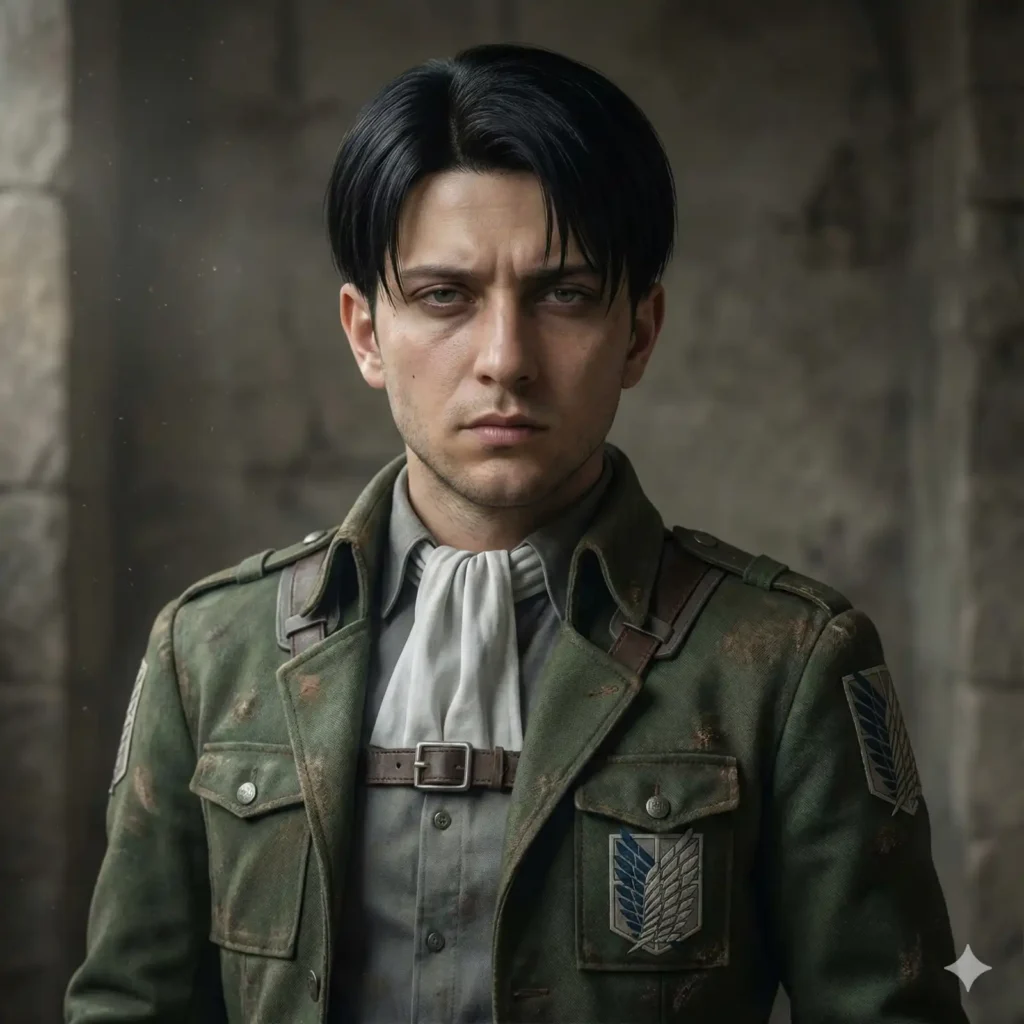
Copy Prompt: Transform the person in the uploaded image into a hyper-realistic, real-life interpretation of Levi Ackerman from Attack on Titan. Preserve the person’s exact facial identity, bone structure, skin texture, and natural expression, but reinterpret them as Levi with full cinematic realism and ultra-detailed rendering. Give them Levi’s signature short, straight, side-parted black hair, styled with precise strands and realistic volume. Recreate Levi’s iconic Survey Corps uniform with deep material texture, including the fitted military jacket, harness straps, shirt, cravat, belts, and worn fabric details. Add the Survey Corps cloak only if it enhances the composition; ensure materials look natural, weathered, and historically grounded. Ensure the physique is lean, athletic, and compact, reflecting Levi’s agility and strength — realistic proportions, not exaggerated. Maintain ultra-detailed skin rendering with visible pores, micro-textures, and lifelike lighting behavior. Apply serious, cold, focused expressions typical of Levi: calm intensity, sharp eyes, and composed posture. Add subtle atmospheric elements such as faint dust, soft directional lighting, and a muted color palette inspired by Attack on Titan’s grounded realism. The final image should appear as if Levi exists in the real world — a studio-grade, 8K cinematic portrait, with no anime styling, no cartoon shading, and no game-like rendering. All elements should blend naturally into a hyper-realistic environment, as though taken by a professional photographer on a film set. Keywords: ultra-photorealistic, dramatic realism, textured clothing, gritty cinematic lighting, high-detail hair, sharp eyes, museum-quality portrait, 8K realism, grounded historical aesthetic, real-world Levi Ackerman interpretation.
3. Light Yagami

Copy Prompt: Transform the person in the uploaded image into a hyper-realistic, real-life interpretation of Light Yagami from Death Note. Maintain the person’s exact facial identity, bone structure, and skin texture, but reinterpret them as Light with full cinematic realism and ultra-detailed rendering. Give them Light Yagami’s signature smooth, medium-length chestnut-brown hair, styled in a soft, layered fringe with natural shine and realistic strand detail. Recreate his iconic polished, clean-cut style, featuring a light beige school blazer, a crisp white dress shirt, a red tie, and tailored dark trousers. Ensure each fabric has believable texture, stitching, and subtle folds that reflect professional studio lighting. Capture Light’s characteristic intelligent, confident, calm-yet-calculating expression, with sharp, focused eyes and a composed posture. Maintain ultra-detailed skin realism with visible pores, natural imperfections, micro-shadows, and photorealistic lighting response. Add a subtle dark, psychological-thriller atmosphere inspired by Death Note — soft shadows, moody cinematic lighting, and a faint noir tone. Optionally, incorporate a minimalist hint of the Death Note itself (e.g., Light holding a sleek black notebook), but in a grounded, realistic manner without any anime-style exaggeration. The final image should appear as if Light Yagami exists in the real world — a high-end 8K, studio-grade cinematic portrait, with zero cartoon or anime stylization and no game-like textures. Everything must feel grounded, modern, and photographically real. Keywords: ultra-photorealistic, cinematic realism, sharp facial detail, subtle psychological intensity, dramatic lighting, natural hair texture, clean aesthetic, 8K clarity, moody atmosphere, real-world Light Yagami interpretation.
4. Saitama
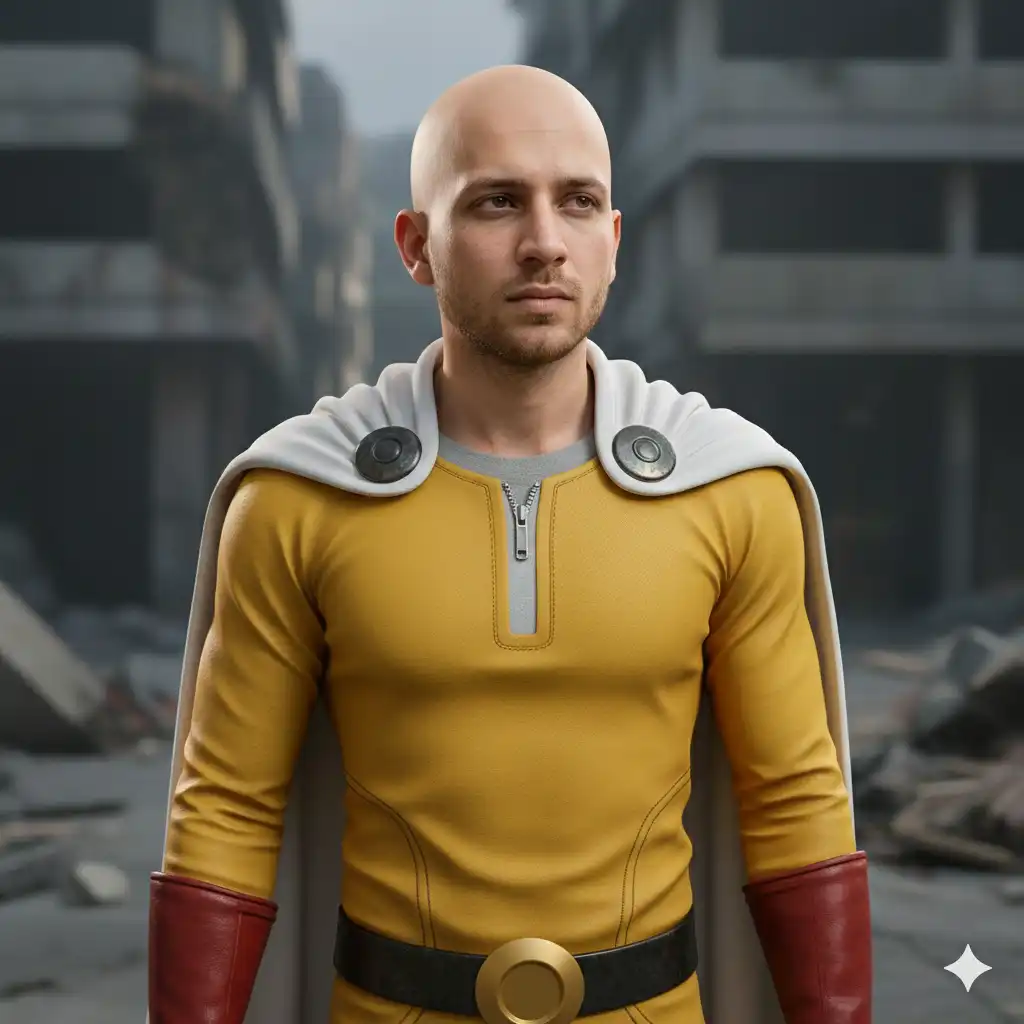
Copy Prompt: Transform the person in the uploaded image into a hyper-realistic, real-life interpretation of Saitama from One Punch Man. Maintain the person’s exact facial features, identity, and skin texture, but reimagine them as Saitama with full cinematic realism and ultra-detailed rendering. Give them Saitama’s signature clean-shaven bald head, with realistic skin texture, natural shading, subtle pores, and accurate anatomical detail. Recreate Saitama’s iconic yellow hero suit with lifelike fabric texture — slightly weathered, matte material with visible stitching and rich depth. Add the white cape with natural draping, realistic cloth weight, soft folds, and metal clasp details. Include the red gloves and red boots, designed with real-world leather/rubber texture, surface reflections, and small imperfections that enhance realism. Ensure the physique is fit, athletic, and natural, not overly muscular — matching Saitama’s deceptively simple but strong build. Capture a calm, emotionless, slightly bored expression with neutral, sharp, observant eyes that reflect Saitama’s understated personality. Maintain ultra-detailed skin rendering, subtle subsurface scattering, micro-shadows, and cinematic lighting. Add a soft, dramatic atmosphere with realistic shadows and minimalistic background styling inspired by One Punch Man’s grounded, urban tone. No cartoon exaggeration, no anime-style shading — everything must look as though Saitama exists in the real world, photographed with a high-end studio camera. The final result should be a hyper-photorealistic, 8K, cinematic portrait of the person transformed into a believable real-world Saitama. Keywords: ultra-photorealistic, detailed skin texture, cinematic lighting, clean minimalist atmosphere, realistic fabric, lifelike expression, 8K realism, grounded superhero aesthetic, real-world Saitama interpretation.
5. Gojo Satoru
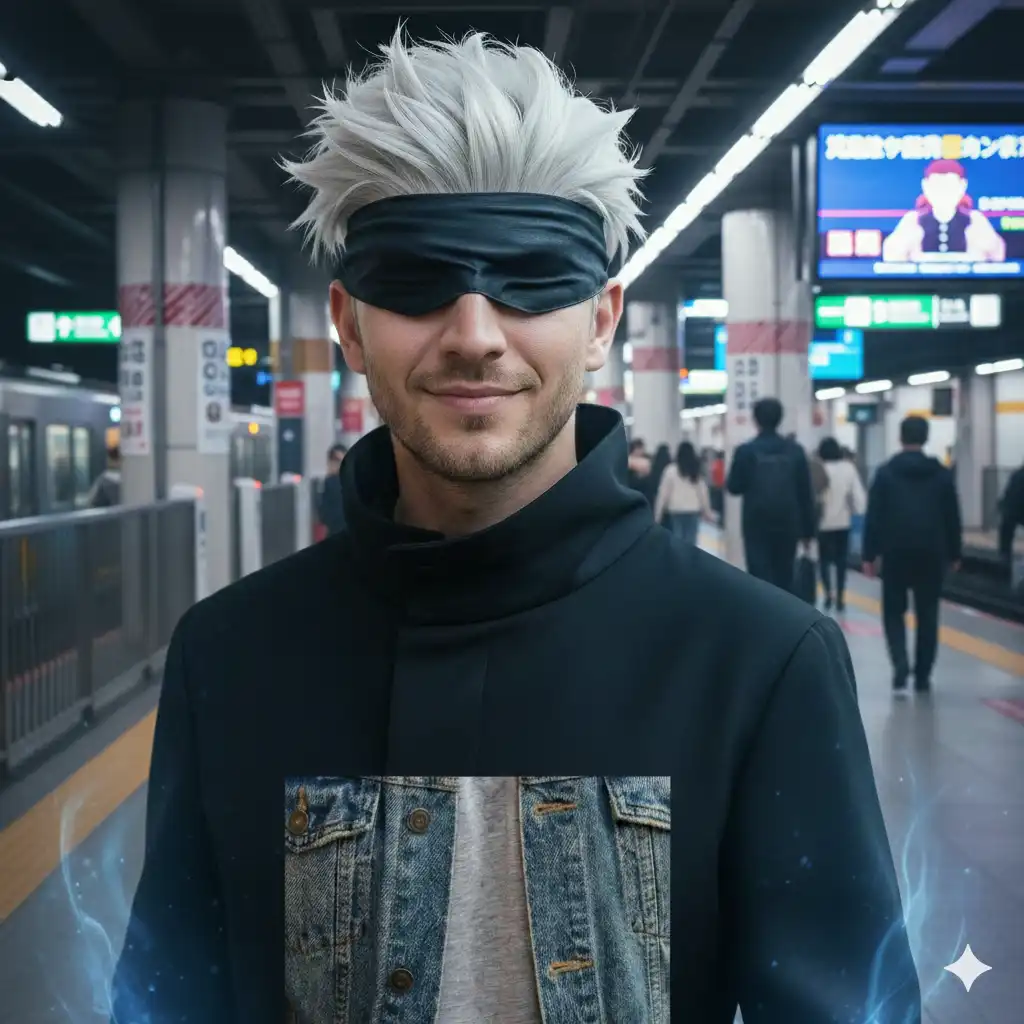
Copy Prompt: Transform the person in the uploaded image into a hyper-realistic, real-life interpretation of Gojo Satoru from Jujutsu Kaisen. Preserve the person’s core facial identity, structure, and skin texture, but reinterpret them as Gojo with photorealistic cinematic detail. Give them Gojo’s iconic white, slightly spiked, soft-textured hair, styled with realistic strands, natural highlights, and airy volume. Include Gojo’s black high-collar jujutsu uniform, rendered with deep fabric texture, matte folds, subtle stitching, and realistic lighting behavior. If fitting, add the black blindfold or dark sunglasses, detailed with natural materials, reflections, and depth. For the facial expression, reflect Gojo’s signature confident, playful, and overwhelmingly powerful aura: – relaxed but sharp eyes (or confident smirk if the eyes are covered) – a subtle, self-assured smile – expression showing effortless superiority and calm control – a hint of mischief, charm, and fearlessness This expression should feel authentic to Gojo and completely realistic, never cartoonish. Maintain ultra-detailed skin realism with pores, natural tone variations, micro-specular highlights, and cinematic light response. The physique should be fit, tall, and lean, matching Gojo’s athletic proportions without exaggeration. Add a subtle, realistic interpretation of Gojo’s Limitless energy aura — soft glowing blues, faint distortions, or refracted light around the body — grounded in physics and integrated into the scene without any anime-style effects. Use dramatic cool-toned cinematic lighting with high contrast, giving a modern, supernatural atmosphere. Slight environmental haze or soft backlight may enhance the presence of cursed energy, as long as it stays photorealistic. The final image must look as if Gojo Satoru exists in real life — a hyper-photorealistic, high-end 8K cinematic portrait of the person transformed into a true live-action version of Gojo. Keywords: ultra-photorealistic, cool cinematic lighting, confident expression, realistic hair physics, supernatural subtle aura, lifelike clothing texture, 8K realism, real-world Gojo Satoru interpretation.
6. Naruto
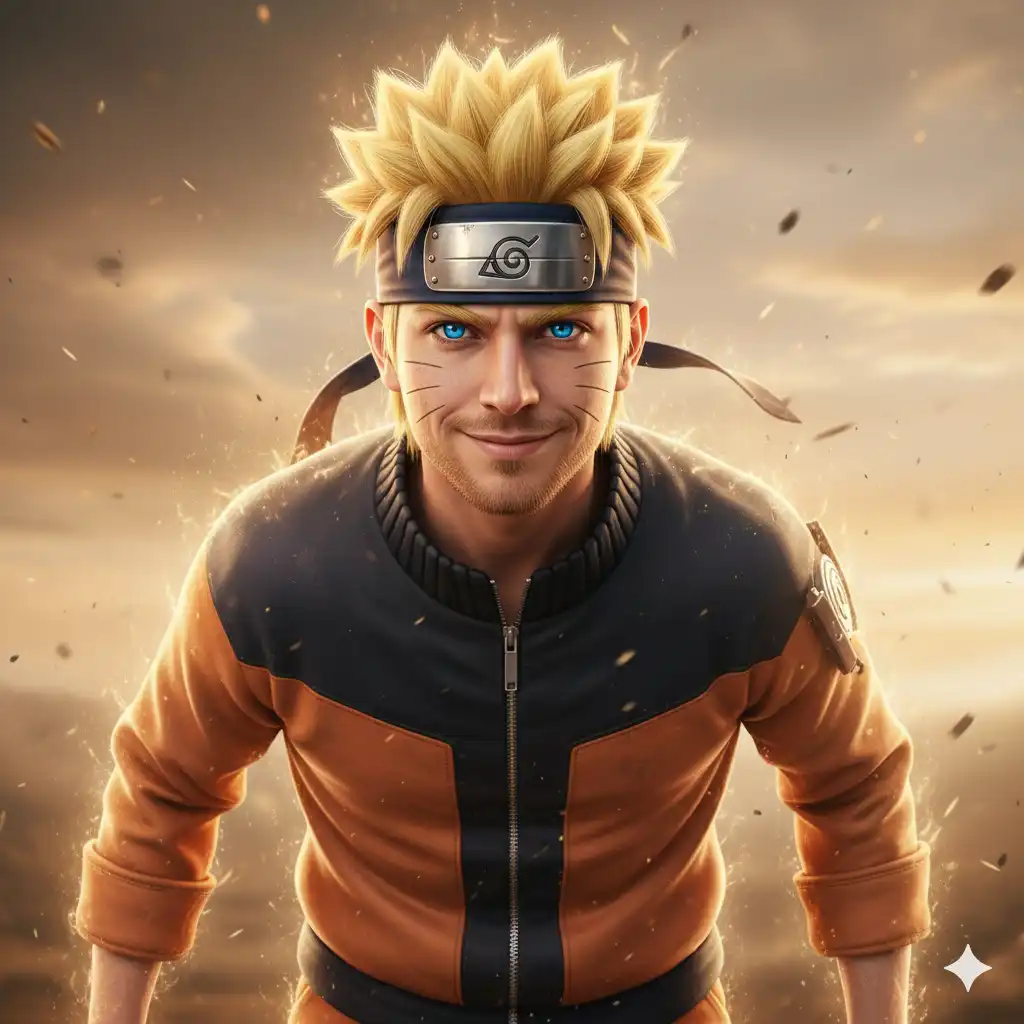
Copy Prompt: Transform the person in the uploaded image into a hyper-realistic, real-life interpretation of Naruto Uzumaki from Naruto. Preserve the person’s core facial identity, bone structure, and realistic skin texture, but reinterpret them as Naruto with full cinematic detail. Give them Naruto’s iconic short, spiky blond hair, with natural strand separation, subtle highlights, and realistic volume. Add the three whisker marks on each cheek, integrated into the skin with believable texture and coloration — not painted on. Recreate Naruto’s classic orange-and-black ninja outfit, featuring realistic fabric texture, stitching, folds, zippers, and weathered details. Include the Hidden Leaf Village headband, with metallic plate reflections and natural cloth wrapping. For the facial expression, capture Naruto’s fearless, determined, hopeful energy: – bright, intense eyes full of ambition – confident, courageous smile or focused battle-ready expression (depending on the vibe) – a natural, uplifting presence that matches Naruto’s personality – expression must feel photographically real, not exaggerated Maintain ultra-detailed skin realism with pores, micro-shadows, subtle imperfections, and lifelike lighting. Give the physique a lean, athletic, agile build, matching a trained shinobi — realistic, not overly muscular. Add a subtle, real-world interpretation of Naruto’s chakra aura: – faint golden light glow – soft dust movement or atmospheric distortion – or a hint of swirling wind inspired by Rasengan energy Everything should be cinematic and grounded, not anime-styled. Use dynamic, warm cinematic lighting, inspired by action scenes or heroic moments. Soft environmental motion or dramatic background elements (light debris, wind, or warm sky tones) may enhance the realism while keeping it grounded. The final image should look like Naruto Uzumaki exists in real life, as seen through a high-end 8K, studio-grade cinematic portrait, with a suitable background. Keywords: ultra-photorealistic, warm dynamic lighting, courageous expression, realistic whisker marks, natural blond hair texture, detailed ninja outfit, subtle chakra aura, 8K realism, real-world Naruto Uzumaki interpretation.
7. Kakashi
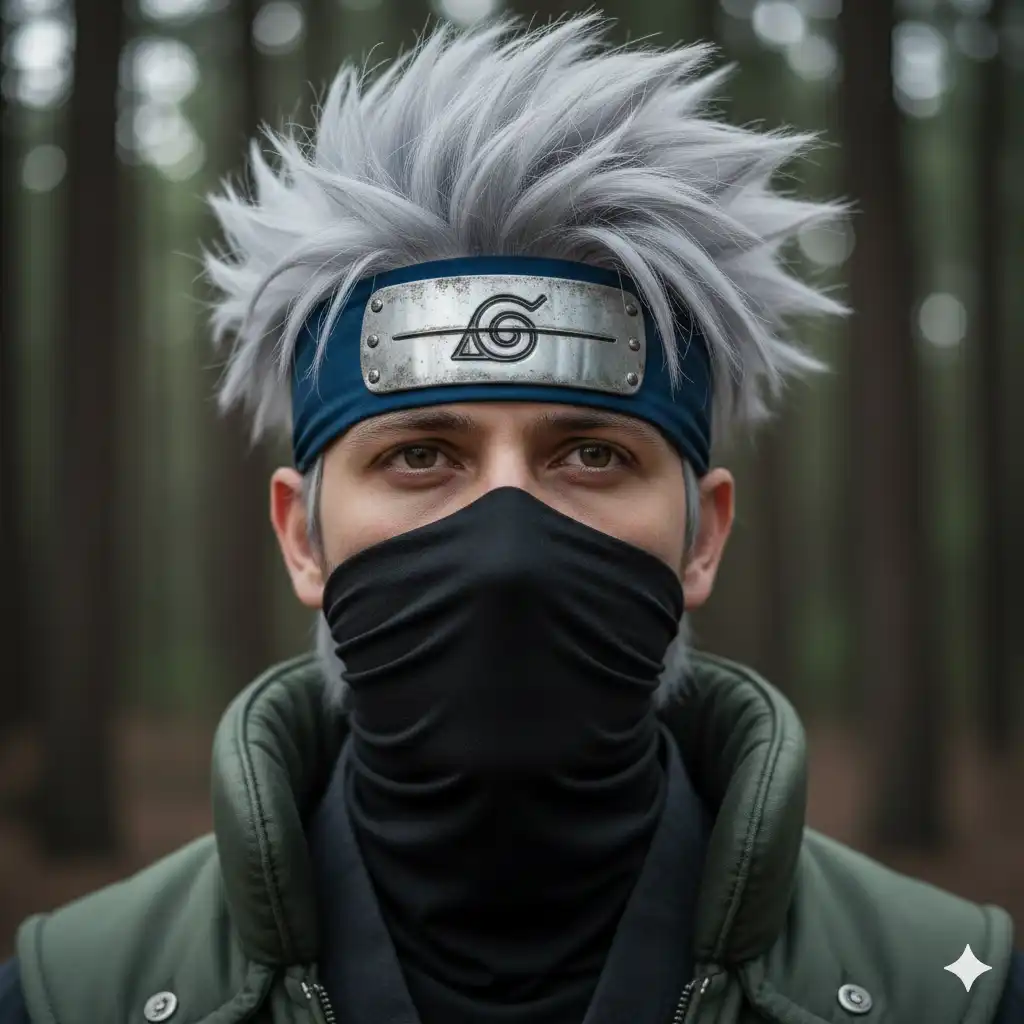
Copy Prompt: Transform the person in the uploaded image into a hyper-realistic, real-life Kakashi Hatake, with the mask pulled down to fully reveal the user’s face while blending Kakashi’s style. Preserve the user’s exact facial features, skin texture, and identity with ultra-detailed, lifelike skin rendering — visible pores, fine wrinkles, subtle scars, natural color variation, micro-shadows, and realistic subsurface scattering. Give them Kakashi’s iconic spiky silver-gray hair, styled naturally with individual hair strands, soft highlights, and realistic volume. Include the blue forehead protector with weathered metal and engraved symbol, worn realistically on the forehead. Dress the person in Kakashi’s dark ninja outfit and green flak jacket with deeply textured fabric, realistic stitching, and natural folds. The jacket should look worn and practical, not stylized. The person is pulling down the black face mask, revealing their real face seamlessly blended with Kakashi’s look, as if Kakashi himself were a real person with this user’s face. Capture a calm, focused expression — thoughtful, slightly intense, reflecting Kakashi’s composed ninja demeanor. The visible eye should be sharply detailed, with natural reflections and lifelike eyelashes. Use ultra-realistic cinematic lighting with soft directional light and natural shadows, emphasizing skin texture and depth without artificial glow or exaggerated effects. Background should be softly blurred and natural, like a real forest environment at dusk. No CGI or game-like glossiness. Aim for the look of a professional high-resolution portrait photo of a real person cosplaying Kakashi, with authentic materials and realistic skin. Keywords: hyper-photorealistic skin texture, natural hair strands, detailed fabric, real user face, pulled-down mask, sharp eye detail, natural subsurface scattering, cinematic lighting, 8K studio portrait, grounded ninja aesthetic.
8. Itachi
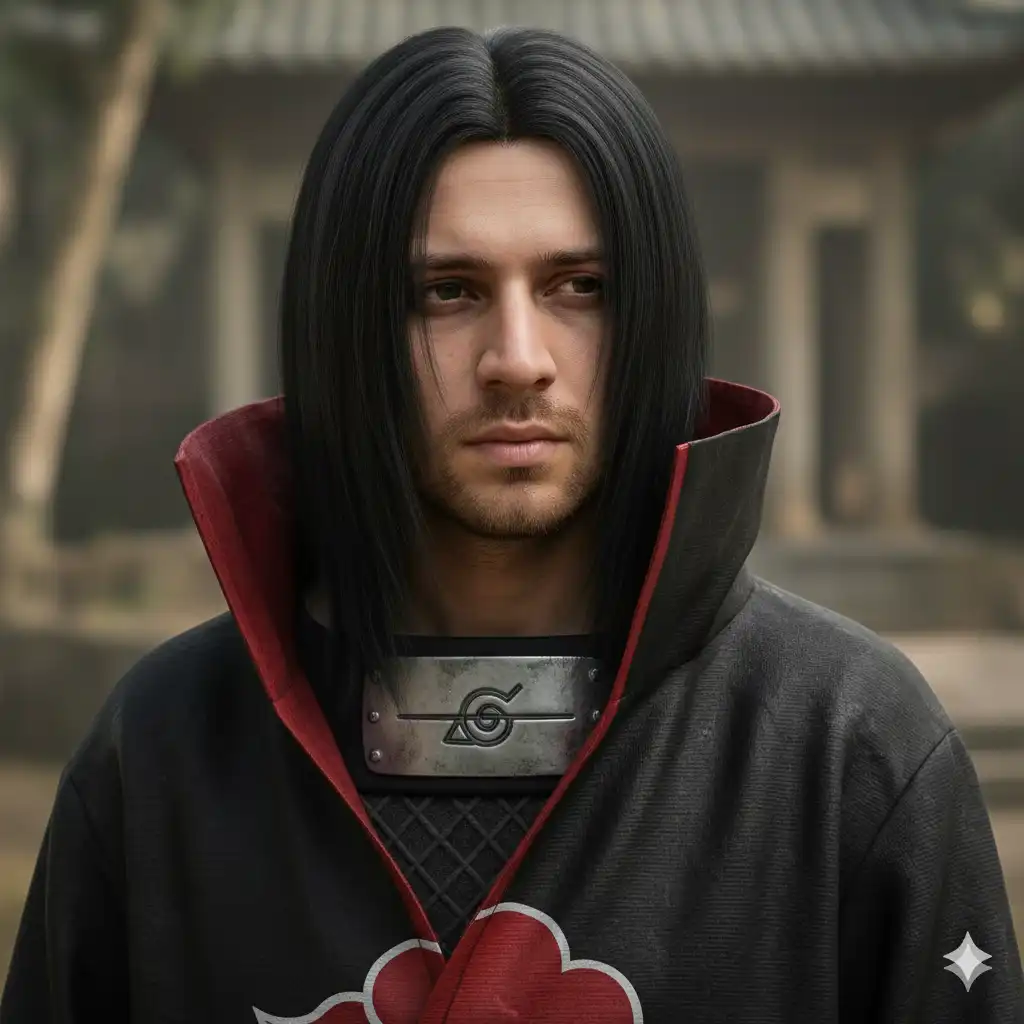
Copy Prompt: Transform the person in the uploaded image into a hyper-realistic, real-life Itachi Uchiha from Naruto, with the user’s actual face fully visible and integrated naturally into Itachi’s look. Preserve the user’s exact facial features, skin texture, and identity with ultra-detailed, photorealistic skin rendering — visible pores, subtle scars or freckles, fine wrinkles, natural color variation, micro-shadows, and realistic subsurface scattering. Give them Itachi’s iconic long, straight black hair parted in the middle, with individual hair strands, natural shine, and volume, realistically falling around the face and shoulders. Dress the person in Itachi’s Akatsuki cloak, richly textured with deep fabric folds, matte black cloth, vivid red clouds, and natural stitching. The cloak should appear heavy and real, with soft shadows and creases. Capture Itachi’s signature calm, serious, and introspective expression — slightly melancholic and composed, with deeply focused eyes. The eyes should be sharp and detailed, with natural reflections and subtle intensity, conveying wisdom and sorrow. Include Itachi’s distinctive forehead protector with the scratch mark, worn realistically on the forehead or tied around the neck, with weathered metal texture and natural cloth folds. Use soft, dramatic, cinematic lighting that emphasizes facial contours, skin textures, and fabric details. The background should be a softly blurred, natural setting with a muted color palette to enhance the solemn atmosphere. No anime-style effects or stylized CGI. The final image should look like a professional 8K photographic portrait of a real person embodying Itachi Uchiha, with authentic materials and ultra-realistic skin. Keywords: hyper-realistic skin texture, natural hair strands, detailed fabric folds, real user face, subtle expression, dramatic soft lighting, 8K ultra-detailed portrait, grounded ninja aesthetic, real-world Itachi Uchiha interpretation.
Where And How to Use?
Now, let’s see how and where to use these prompts to get accurate and desired results.
1. First, visit Gemini’s official website on https://gemini.google.com/, then click on “Tools” button down there, and select “Create images” from the dropdown list.

2. Make sure you have selected the Pro model of Gemini. To check whether it’s selected or not, simply click on either “Thinking” or “Fast” button down there, and if it’s set on “Fast”, switch it to “Thinking” with 3 Pro.

3. Now we have to upload the image of birthday boy. Click on ‘+’ button down there, and click on “Upload files” option, then a pop-up will appear from you local machine, where you have to select your image.
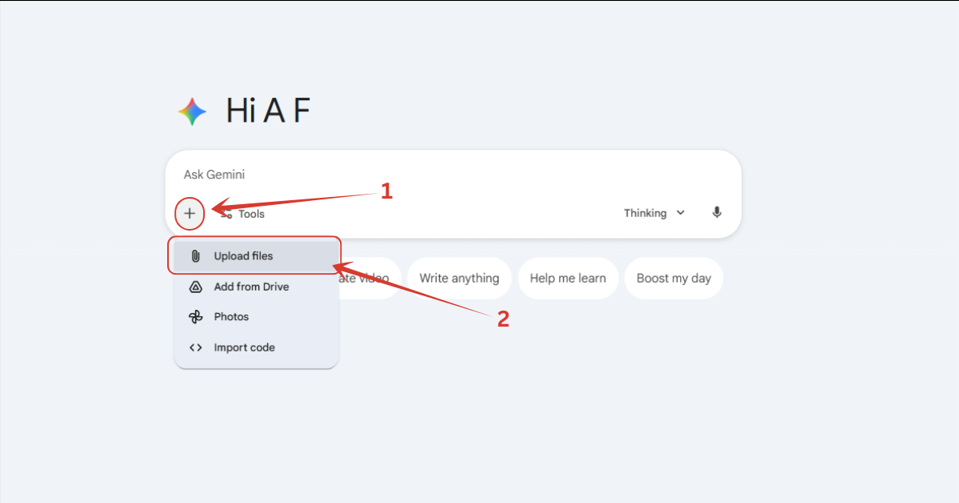
4. After uploading the image, pick any prompt from the above list whichever you like, enter it, wait until the image gets processed, and you are good to go.
Also Read:
Rehman Dakait Gemini Prompt Copy PasteTop 8 Trending Winter Photo Gemini Prompts – Copy and Paste
8 Trending Gemini Boys Birthday Prompts for a Truly Magical Celebration
Note: I will be bringing a part two of this post for sure, as there are many anime characters left. So, be in touch and keep your support guys.
People Also Ask:
It’s simple. First, go to Gemini, add your photo, and select one of any anime prompt from the list above. Copy and paste it, hit enter, and wait few seconds, and you are done.
The best AI right now which gives exceptional realism and ultra detailed textures in it’s outputs is none other than Nano Banana Pro. You can access it from Gemini, Flow and other sources too.
Not really. Just make sure your face is clear, well-lit, and not covered by hair, masks, or filters. AI performs best when it clearly sees your features.
AI models introduce slight randomness in each generation. If the first image isn’t perfect, simply run the same prompt again — results usually improve within 1–2 tries.
No. These prompts are already tested and optimized. Avoid editing them; simply retry if the first output isn’t accurate enough.
Yes! As long as you have permission. Just upload their photo and paste the prompt — the AI will adjust it to their face.
Conclusion
And that’s it — you’re now fully ready to turn your own photos into insanely realistic, live-action–style anime portraits. Whether you want to become Goku, Naruto, Gojo, or even Saitama, these prompts are crafted to give you clean, sharp, ultra-detailed results without any confusion or tweaking.
Remember, the magic comes from just three things:
- A clear photo of yourself
- A solid prompt (which you already have)
- A few seconds of AI processing
If one result doesn’t hit the mark, don’t stress — simply try again. The prompt is already optimized, and sometimes it just takes 1–2 retries for the perfect output.
And yes, as said earlier, part two is definitely coming soon with more characters, more styles, and even crazier transformations. Stay tuned — and have fun turning yourself into the anime world’s next big legend!




Leave a Reply