

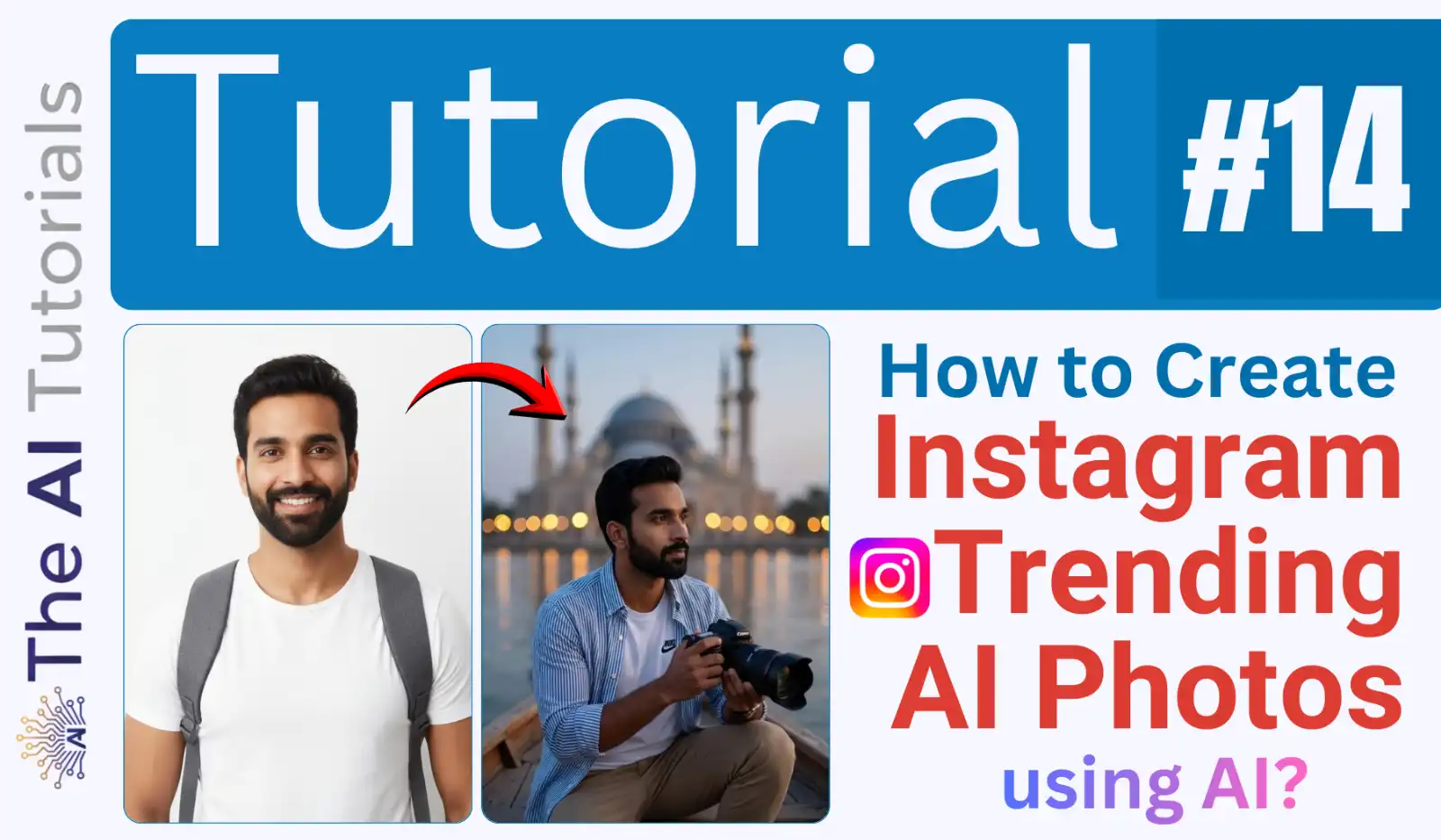
You may have scene those reels and posts on Instagram where you friend or a random guy is posting his photos, and the photo is so astonishing that you just pause your finger for a moment so the reel don’t get scrolled up.
Before AI, making such photo edits was actually a time taking process, like having a good software, editing skills, and most importantly, you must have time.
But nowadays, making such portraits and impressive images has become work of a few seconds.
All you need is a correct prompt and your photo, and within few seconds, your astonishing image will be ready to post on social media.
I won’t only give you one prompt, but collection of prompts which will give you different yet amazing results, along with examples.
Let’s see how we too can make such impressive photo edits and gain attention.
Key Takeaways:
- We need only two things to create amazing images of ourselves, first, of course your photo, and a rightly crafted prompt, which you will get in this tutorial.
- We will be using Nano Banana Pro to generate the images. If you don’t know how to use Nano Banana Pro, here it is.
- Nano Banana Pro can be access via several platforms, but will access it from Gemini.
Step by Step Tutorial:
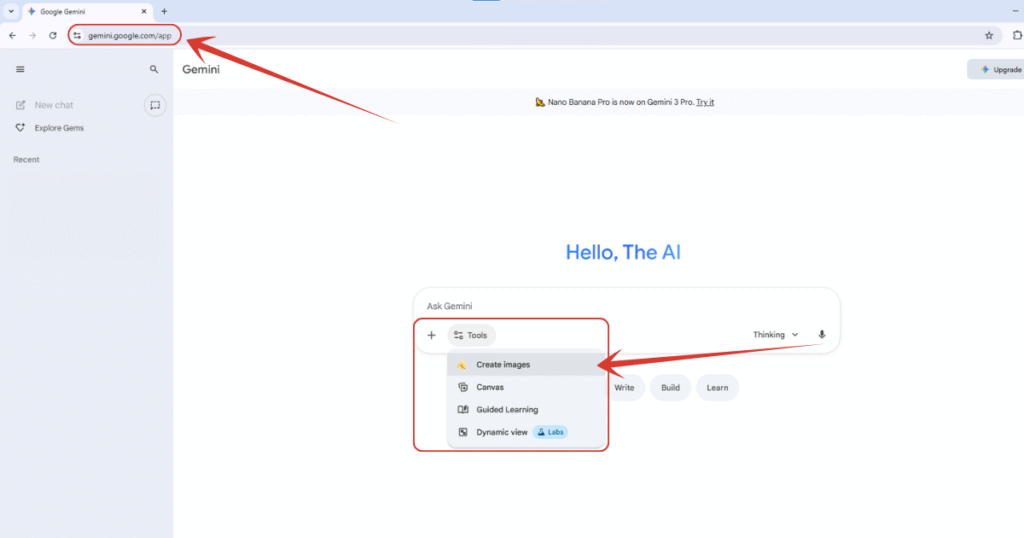
1. Will first move to https://gemini.google.com, and select “Create Images” option which will load Nano Banana Pro in the backend. By the way, if you want to claim Gemini Pro for 18 months, all for free, read this tutorial where I have explained it step by step.
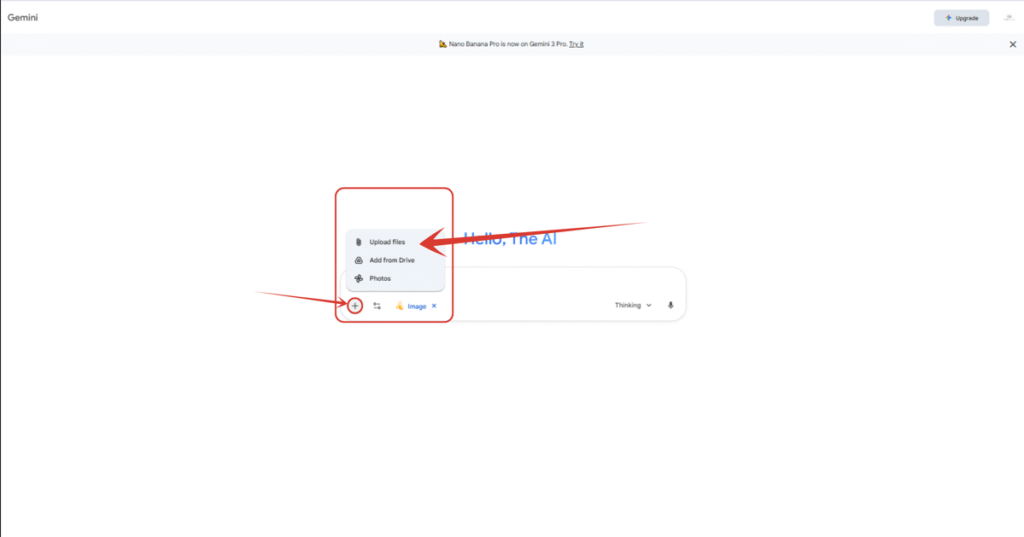
2. Click on the ‘+’ icon, and select “Upload files” option, and upload your photo.
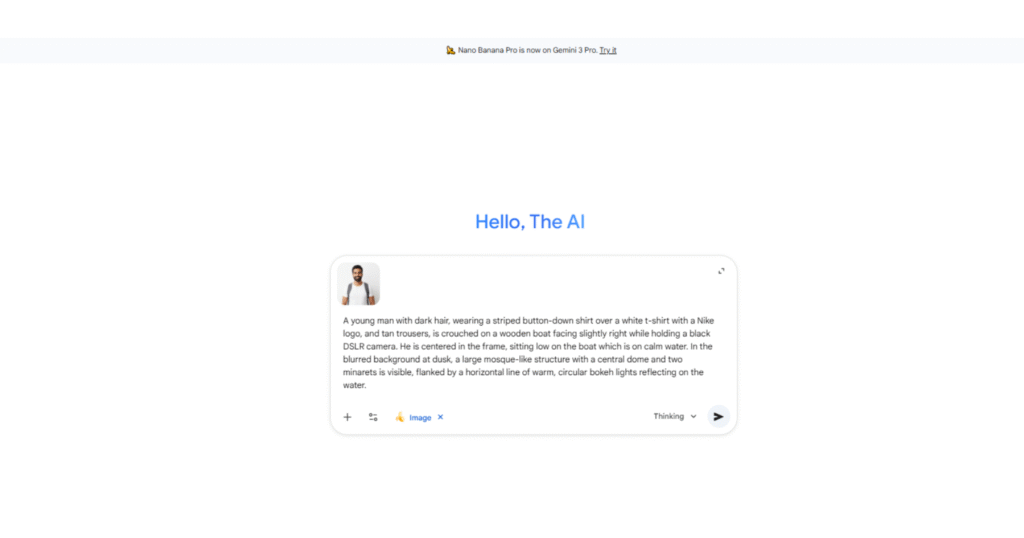
3. I have uploaded an image which I have generated through AI itself in past days. Now we have to enter the prompt.
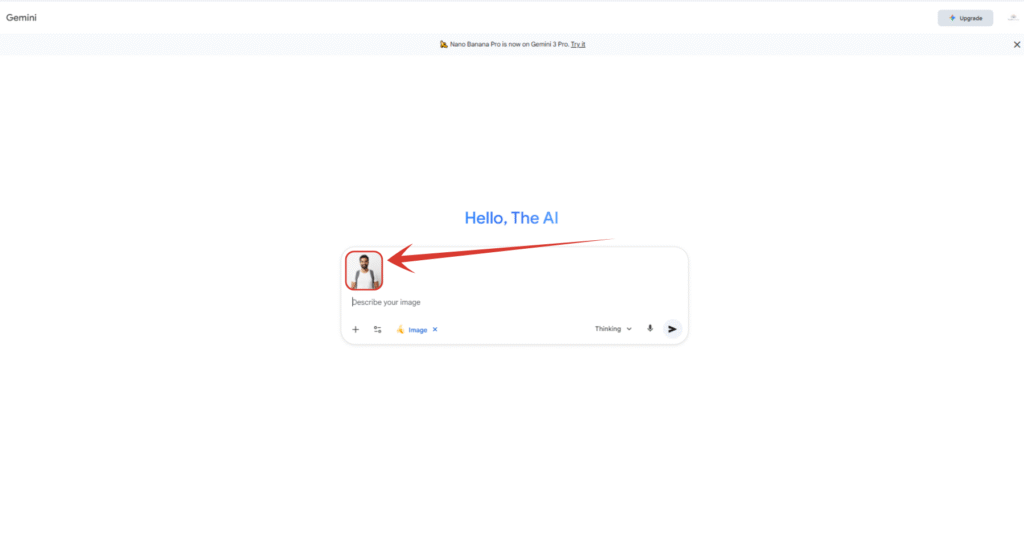
4. Copy and paste the below prompt.
The Prompt:
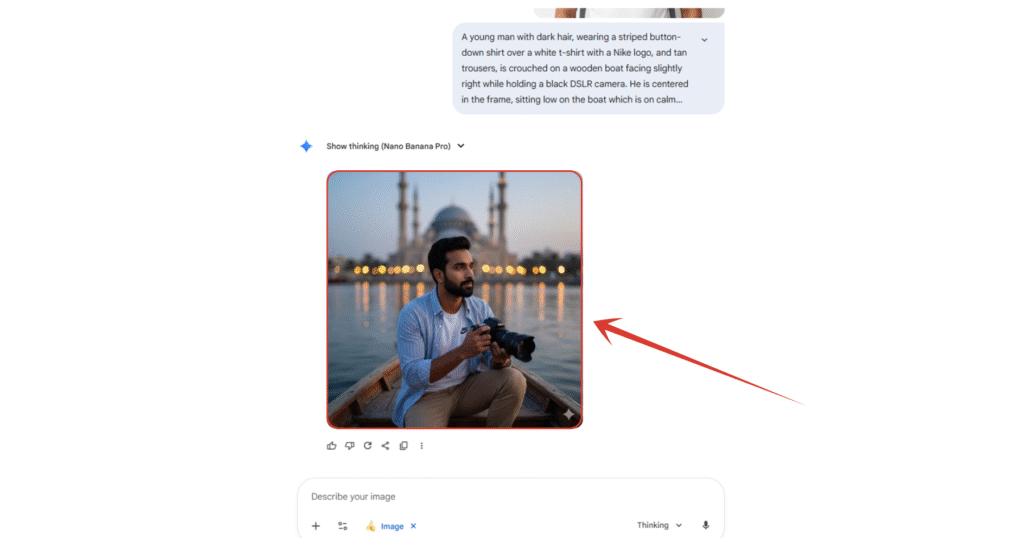
“A young man with dark hair, wearing a striped button-down shirt over a white t-shirt with a Nike logo, and tan trousers, is crouched on a wooden boat facing slightly right while holding a black DSLR camera. He is centered in the frame, sitting low on the boat which is on calm water. In the blurred background at dusk, a large mosque-like structure with a central dome and two minarets is visible, flanked by a horizontal line of warm, circular bokeh lights reflecting on the water.”
5. And here is our image we got within few seconds. You can imagine how long will it take to do it manually. Posing, capturing, editing, then a final result. But here, just your photo, a rightly crafted prompt, and you are done.
Other Prompts and Results:
1. Cinematic Portrait Effect

Prompt:
“TANPA MENGUBAH FITUR WAJAH SAYA, CIPTAKAN POTRET MODERN DAN BERGAYA DARI SEORANG PRIA MUDA DENGAN WAJAH REFERENSI YANG SAMA, RAMBUT BERANTAKAN, MENGENAKAN SWEATER WOL HITAM DAN PUTIH YANG LONGGAR. SATU-SATUNYA DILENGKAPI DENGAN JAM TANGAN. LATAR BELAKANGNYA LEMBUT, MINIMAL, DAN DIBURAMKAN SECARA HALUS UNTUK MENONJOLKAN VIFAC MODE-FORCE KONTEMPORER. PENCAHAYAAN SINEMATIK, TEKSTUR REALISTIS YANG SANGAT DETAIL, DAN ESTETIKA EDITORIAL YANG DIPOLES DENGAN WAJAH YANG SAMA.“
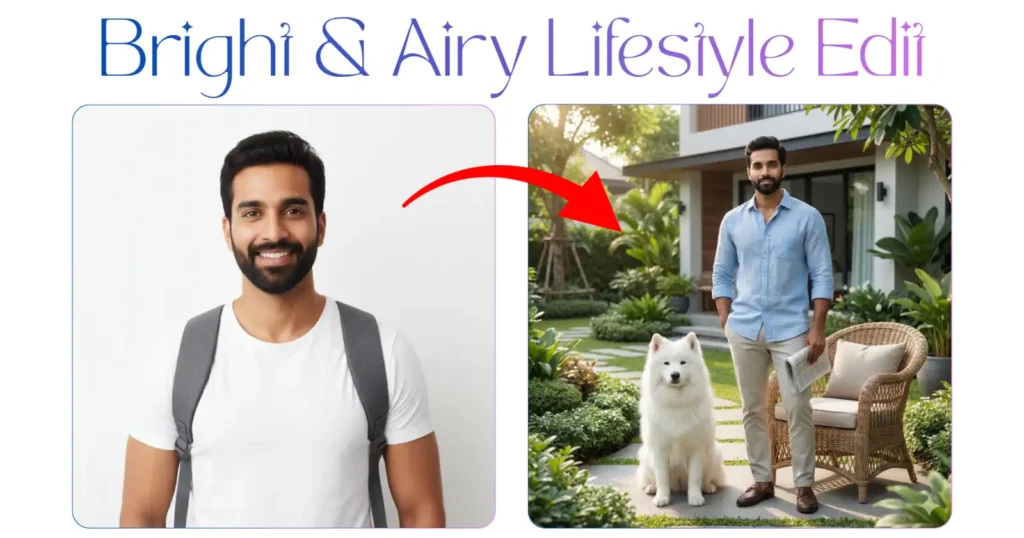
2. Bright & Airy Lifestyle Edit
Prompt:
“Ultra-photorealistic 8K editorial full-body portrait of a handsome stylish man (same face & perfectly styled hair from uploaded photo), standing confidently beside a wicker armchair in a beautiful luxurious garden outside a modern bungalow. One hand casually in his pocket, the other holding a folded newspaper by his side. His face slightly turned toward the camera with a calm, cool, confident expression. Beside him, a majestic white Samoyed dog sits obediently near his feet, looking composed and confident.“
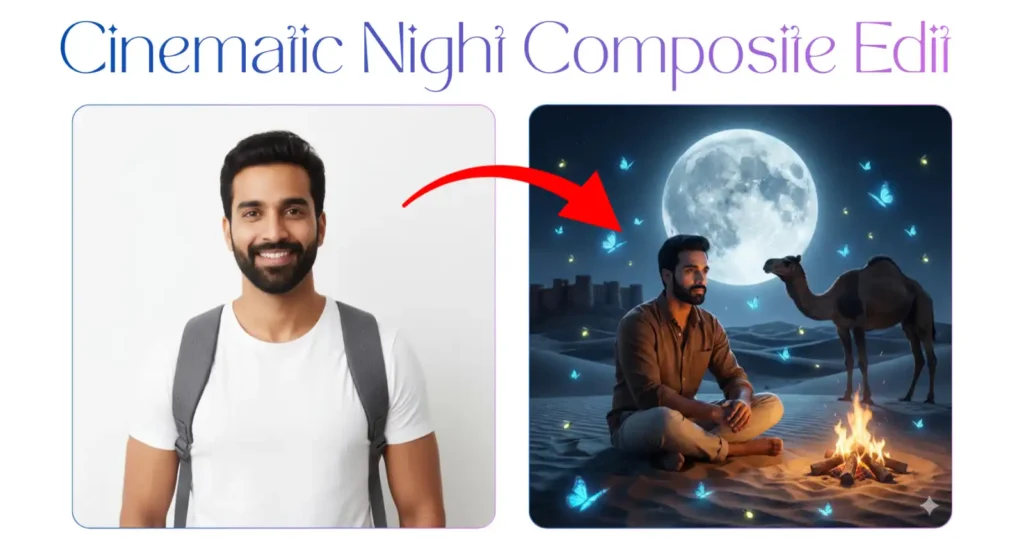
3. Cinematic Night Composite Edit
Prompt:
“Ultra-photorealistic 8K desert night masterpiece, man with reference face sitting alone on cool Jaisalmer dunes under enormous glowing moon, pristine brown shirt contrasting golden sand, Beige pent. surrounded by floating luminous blue glow butterflies and jugnu, Camele behind him, small campfire casting warm glow on face, contemplative expression, distant fort silhouette, cold moonlight with warm highlights, ethereal yet completely real. Photorealistic scene.“
4. Festive Bokeh Portrait Effect
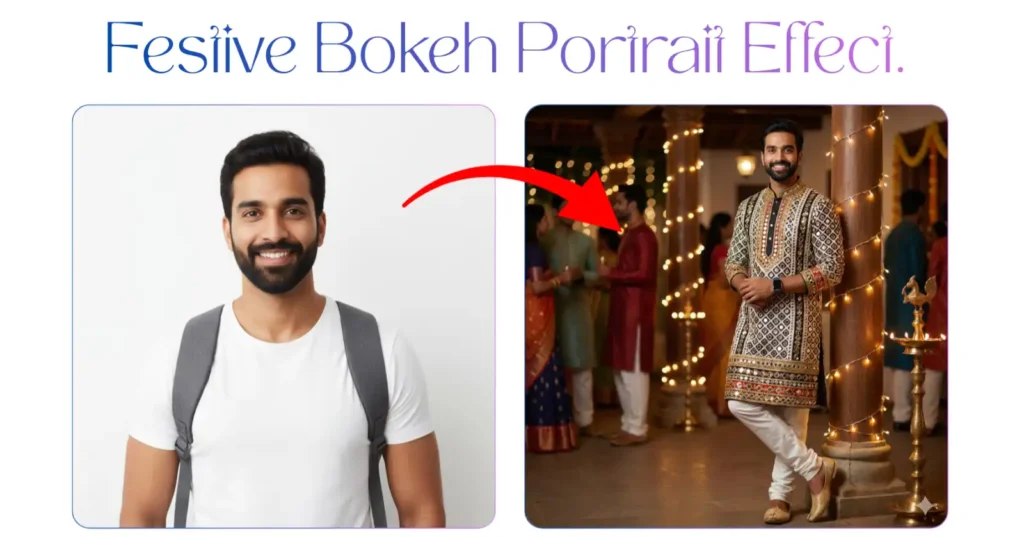
Prompt:
“Full-body portrait of a young man standing in a festive Indian cultural event, leaning casually against a carved wooden pillar wrapped with warm fairy lights. He is wearing an ornate, mirror-work traditional kurta with multicolor embroidered patterns in black, white, gold and red, paired with white churidar pants and golden mojari shoes. Smartwatch on his wrist. Background filled with soft bokeh lights, decorated pillars, traditional lamps, and people in colorful ethnic outfits blurred out.“
5. High Dynamic Range (HDR-like Pop)
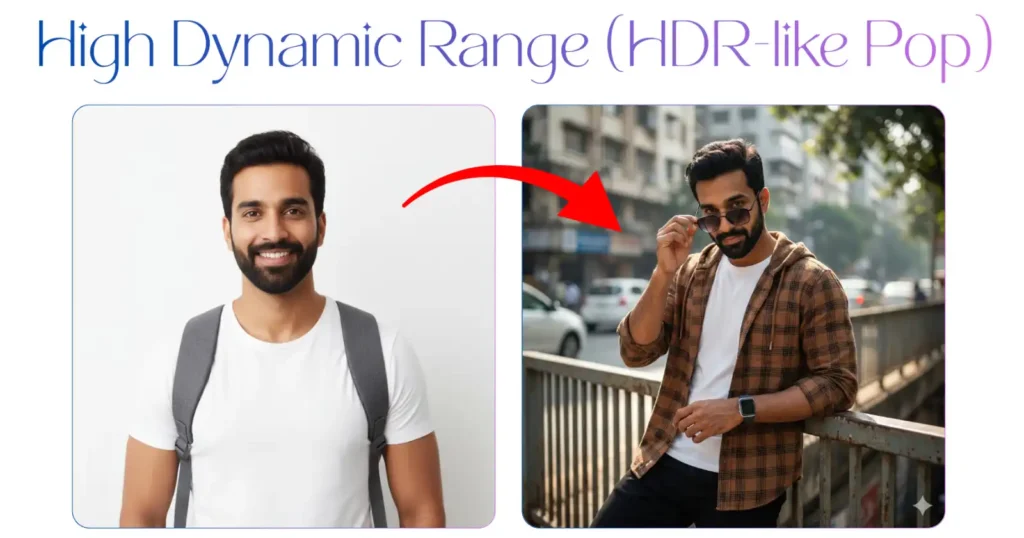
Prompt:
“Ultra-realistic cinematic HDR DSLR portrait of a uploaded handsome man wearing a brown check button-down hoodie shirt over a white tee, black pants, smartwatch, Holding black-gradient thin-frame sunglasses slightly down his nose with both hands, looking directly with a flirt-like gaze. Leaning against a steel railing, neutral expression. Daylight urban backdrop with buildings and light vehicle blur, dramatic HDR contrast, dappled natural light, shall professional Photoshop-grade cinematic“
Also Read:
How to Make Glowing Instagram Profile for Free? Step by Step TutorialHow to Create Instagram Trending 3D Model Using Nano Bana? Step by Step Tutorial
Top 8 New Trending ChatGPT Dhurandhar Movie 4K AI Photo Prompts
People Also Ask:
You usually cannot create high-quality AI photos directly inside the Instagram app. Most people use external AI tools like Google Gemini (Nano Banana Pro), Bing Image Creator, or Midjourney to create the photo first, and then upload it to Instagram like a normal post.
To make trending images, you need two things: a good AI tool (like the one shown in this tutorial) and a specific “prompt” (description). You simply upload your photo, paste the trending prompt, and the AI creates the image for you.
You don’t need to edit manually using software like Photoshop anymore. In AI tools, “editing” means changing the text prompt. If you want a different background or outfit, just change the words in your prompt, and the AI redraws the picture for you.
Instagram has some basic AI features like “Backdrop” for Stories or “AI Studio” for chats, but for the viral, high-quality portraits you see on Reels, people are using outside tools like Google Gemini or Lensa, not Instagram itself.
Everyone is using AI generators. They take a normal selfie, upload it to a tool like Nano Banana Pro, and use a detailed description (prompt) to turn that selfie into a cinematic or artistic photo within seconds.
Conclusion
Creating viral, professional-looking photos for Instagram is no longer difficult or expensive.
You don’t need a DSLR camera or years of editing experience. As shown in this guide, all you need is a simple photo of yourself and the right text prompt.
By using tools like Nano Banana Pro, you can create stunning images in seconds that are sure to stop the scroll and get likes.



Leave a Reply