

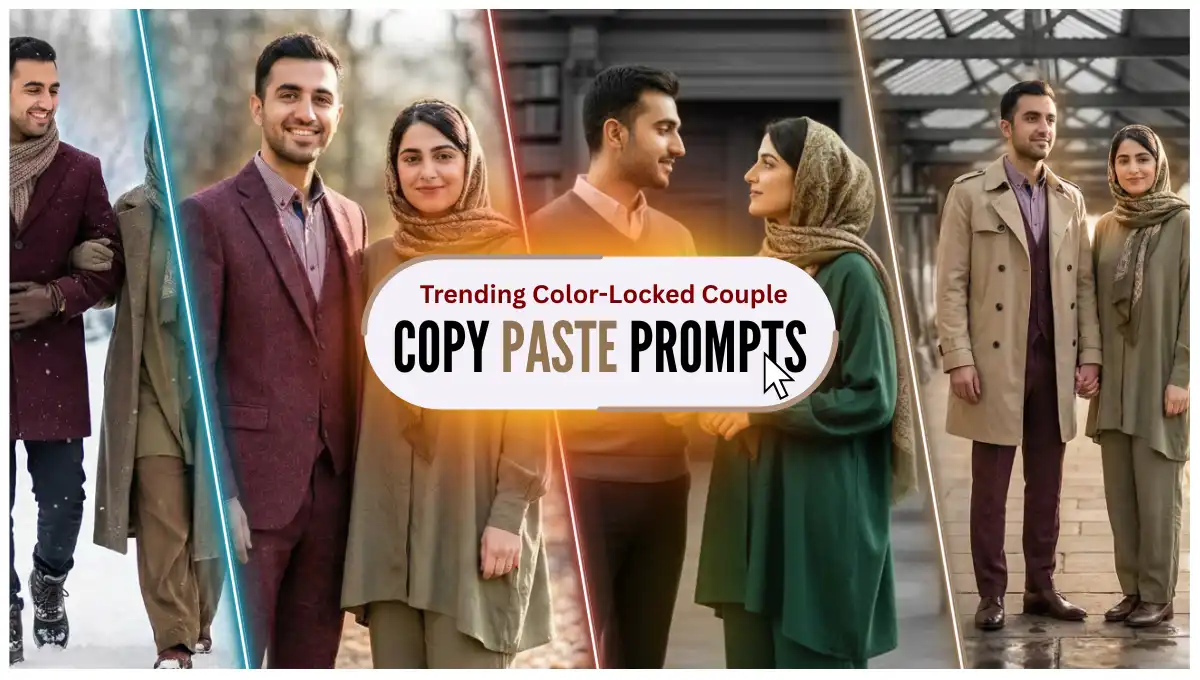
Every week is bringing a new trend where people are making stunning and glance-worthy stuff like images and videos using AI.
If we talk about making images, Gemini has taken the lead here. Every one is generated literally every second image from Gemini, which has Nano Banana Pro. And I don’t need to explain how powerful Nano Banana Pro is.
A new trend has started where people making AI generated photos with their partners in which the background is entirely black and white, while the couple remains in color with a soft glow matching the colors of their outfits. Perfect for moments they want to remember lifelong.
Let’s decode it and have a look how you too can make such trending stuff.
First, you have a look at the prompts along with the output results, then you see the tutorial where I have shown where and how to use these prompts.
Key Takeaways:
- These images are perfect if your partner’s birthday or your anniversary is nearby. A new way to celebrate this year.
- We will be using Nano Banana Pro through Gemini. By the way, if you want to claim Gemini Pro for 18 months, all for free, read this tutorial where I have explained it step by step.
- Below you will find prompts along with their results. Pick any which you like and generate yours.
- If you didn’t get expected results in first attempt, just keep trying until you get it as the prompts have crafted carefully to get the desired results as shown in the images.
Prompts with Outputs:
1. Couple at Restaurant
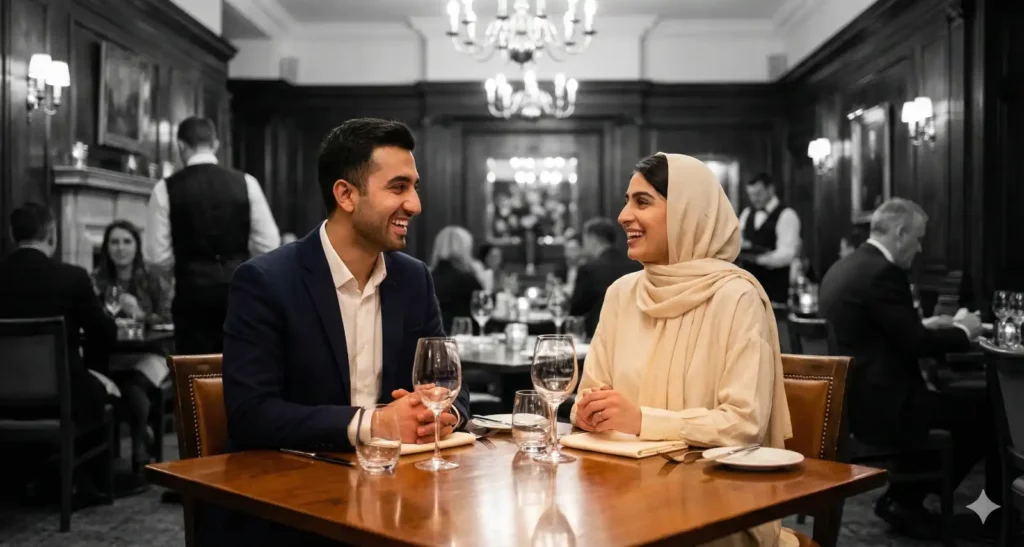
Copy Prompt: Create an ultra-realistic, highly detailed photograph of the couple seated at a table in an elegant, upscale restaurant. The man wears a stylish dark blazer and crisp shirt, while the woman wears modest, loose-fitting clothing with a neatly wrapped headscarf, her outfit matching the soft color palette of the restaurant. Their expressions are relaxed, joyful, and naturally engaged in conversation. Other diners and staff are present in the background but rendered entirely in black-and-white, slightly blurred to maintain focus on the couple. The couple remains fully colorful, with a soft, warm glow emanating from their attire, subtly illuminating their surroundings. Reflections on polished surfaces, soft ambient lighting, and realistic shadows create a lifelike, photorealistic atmosphere.
2. Couple in Forest Path Portrait
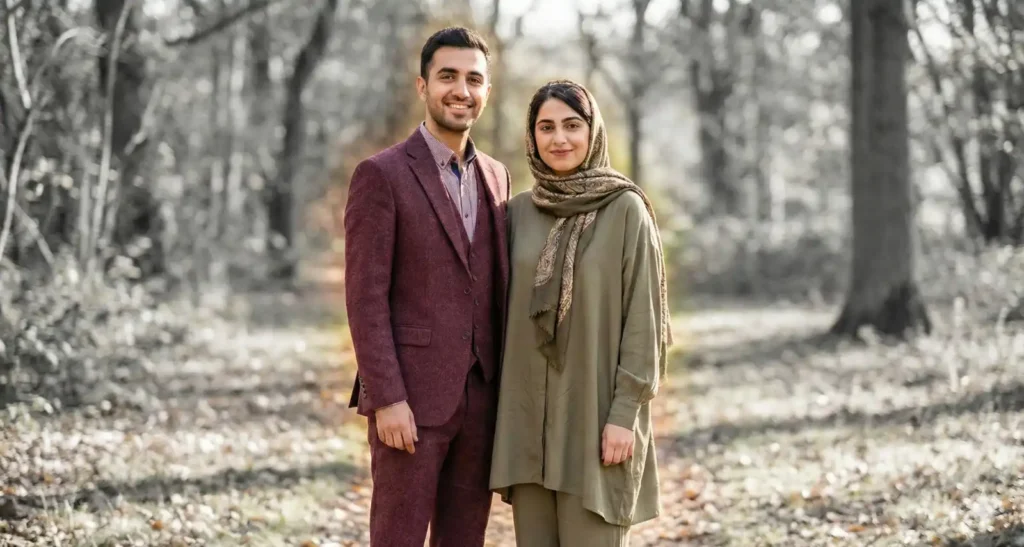
Copy Prompt: Create an ultra-realistic and highly detailed photograph based on the given reference image, keeping the couple fully in vibrant color while converting the entire background to black-and-white (grayscale). Add a soft, natural-colored glow emanating gently from their clothing, matching the colors of their attire and radiating outward subtly to highlight their presence. The man wears a maroon suit, and the woman is dressed in modest, loose-fitting attire that conceals her body shape, with a headscarf covering her hair completely. Both wear warm, down-to-earth smiles. The lighting, textures, and shadows should remain photorealistic, with a smooth and seamless transition between the colorful, glowing couple and the grayscale background.
3. Couple at Modern Art Gallery
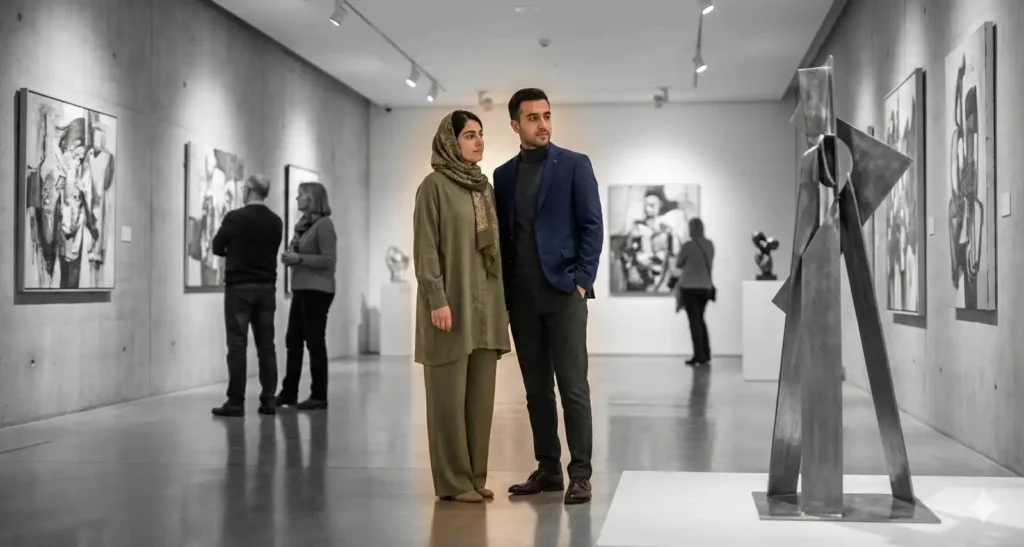
Copy Prompt: Create an ultra-realistic, highly detailed photograph of the couple standing or slightly leaning near contemporary art pieces inside a gallery. The man wears a smart-casual blazer and turtleneck, while the woman wears modest, elegant loose clothing with a neatly wrapped headscarf. Their expressions are engaged and thoughtful, observing the artworks. The gallery walls, floors, and other visitors are black-and-white, slightly blurred for depth, while the couple remains fully colorful. A soft, natural glow radiates from their attire, highlighting their presence and creating a subtle reflection on polished floors. Shadows and gallery lighting are carefully rendered to enhance realism.
4. Couple on a Beachside Boardwalk at Sunset
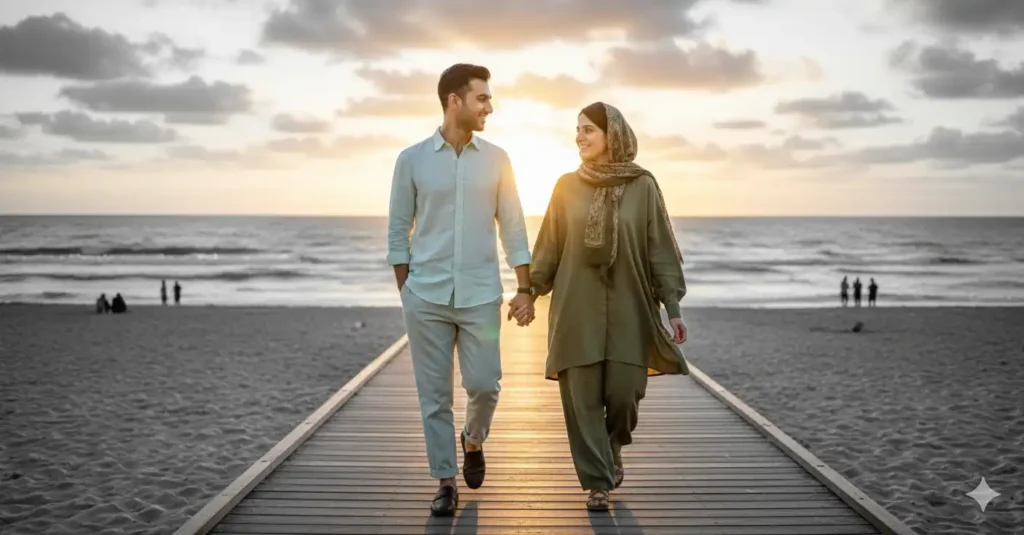
Copy Prompt: Create an ultra-realistic, highly detailed scene of the couple walking along a beachside boardwalk during sunset. The man wears a light linen shirt and relaxed trousers, while the woman wears modest, flowing loose attire with a headscarf, her clothing gently moving in the breeze. Their expressions are peaceful, content, and connected. The ocean, sand, and sky in the background are black-and-white, with distant people blurred and desaturated. The couple is fully colorful, with a soft colored glow emanating naturally from their clothing, blending gently with the warm sunset light. Reflections on the wet boardwalk and natural shadows make the scene lifelike.
5. Couple in a Classic Library
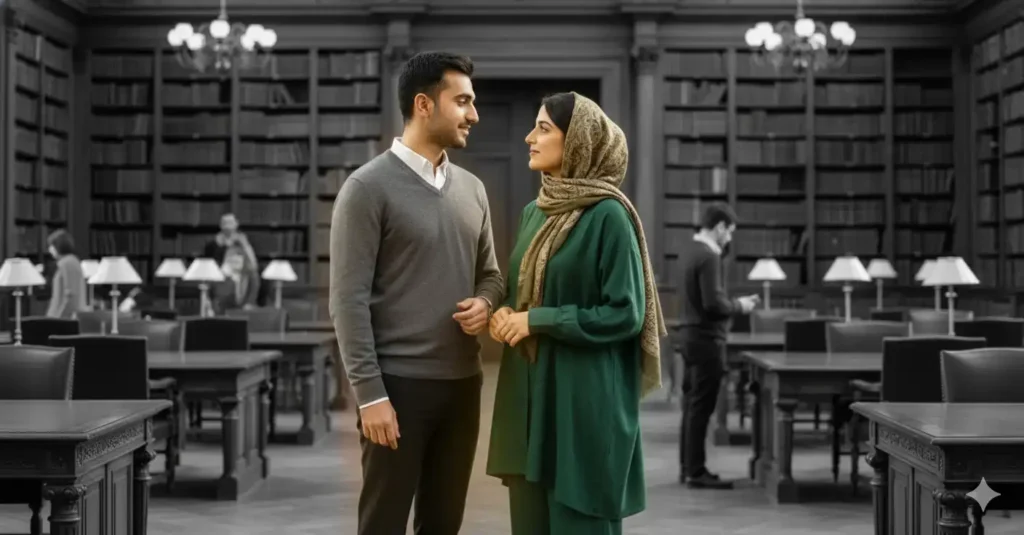
The Prompt: Create an ultra-realistic, highly detailed photograph of the couple inside a grand, classic library. The man wears a smart sweater over a collared shirt, while the woman wears modest, flowing loose clothing with a neatly wrapped headscarf. Their expressions are calm, engaged, and thoughtful, perhaps mid-conversation while exploring the library. Tall bookshelves, desks, and a few background visitors, and the overall background is black-and-white, slightly blurred to maintain focus. The couple is fully colorful, with a soft, colored glow emanating from their attire, subtly lighting the surrounding wooden surfaces and books. Warm interior lighting and realistic shadows enhance depth and photorealism.
6. Couple at Vintage Train Station
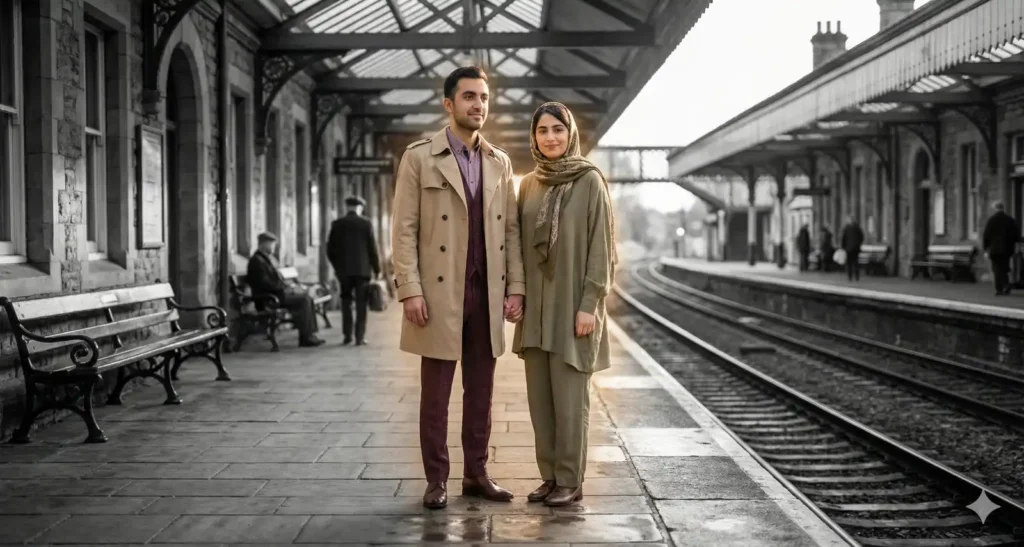
The Prompt: Create an ultra-realistic, highly detailed photo of the couple waiting on a vintage train station platform. The man wears a classic trench coat over formal attire, while the woman is dressed in modest, loose vintage-inspired clothing with a headscarf tied neatly. Their expressions are calm and expectant, standing close but relaxed. The train station architecture, tracks, and distant travelers are entirely black-and-white with soft focus. The couple remains fully colorful with a warm, subtle glow gently radiating from their outfits, softly illuminating the immediate area around them. The lighting is natural with realistic shadows and reflections on polished surfaces.
7. Couple at Winter Snowy Park
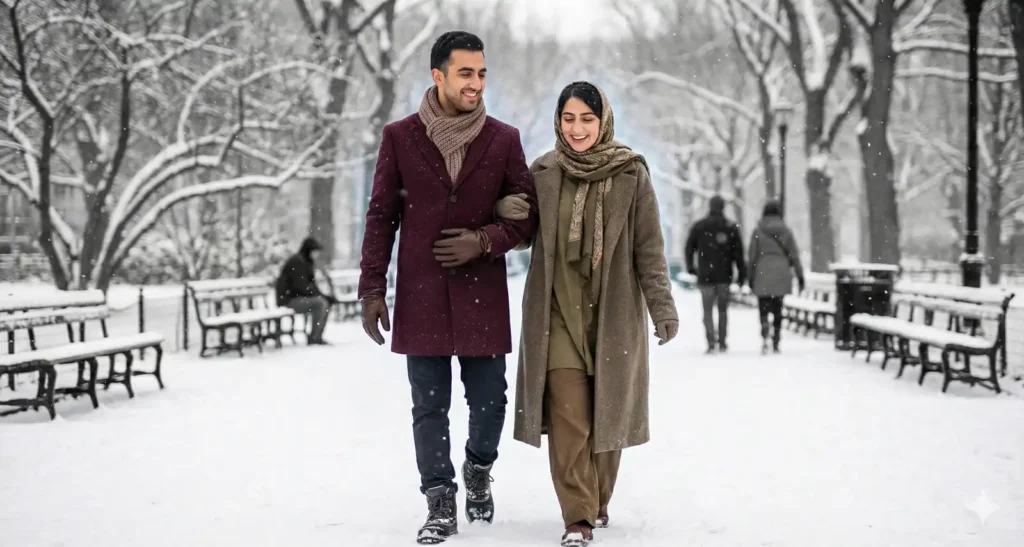
Copy Prompt: Create an ultra-realistic, detailed photograph of the couple walking through a snowy city park in winter. The man wears a thick wool coat and scarf, while the woman is wrapped in modest, loose warm clothing and a headscarf, layered appropriately for cold weather. Their expressions are joyful and connected, enjoying the snow. The snow-covered trees, benches, and park paths are black-and-white, with a few blurred park visitors in the distance. The couple remains in vibrant color, with a soft, cool-toned glow radiating from their clothing, blending naturally with the cold atmosphere. Snowflakes and realistic shadows complete the scene.
Step by Step Tutorial:
Now, let’s see how and where to use these prompts to get accurate and desired results.
1. First, visit Gemini’s official website on https://gemini.google.com/, then click on “Tools” button down there, and select “Create images” from the dropdown list.
By the way, if you want to claim Gemini Pro for 18 months, all for free, read this tutorial where I have explained it step by step.

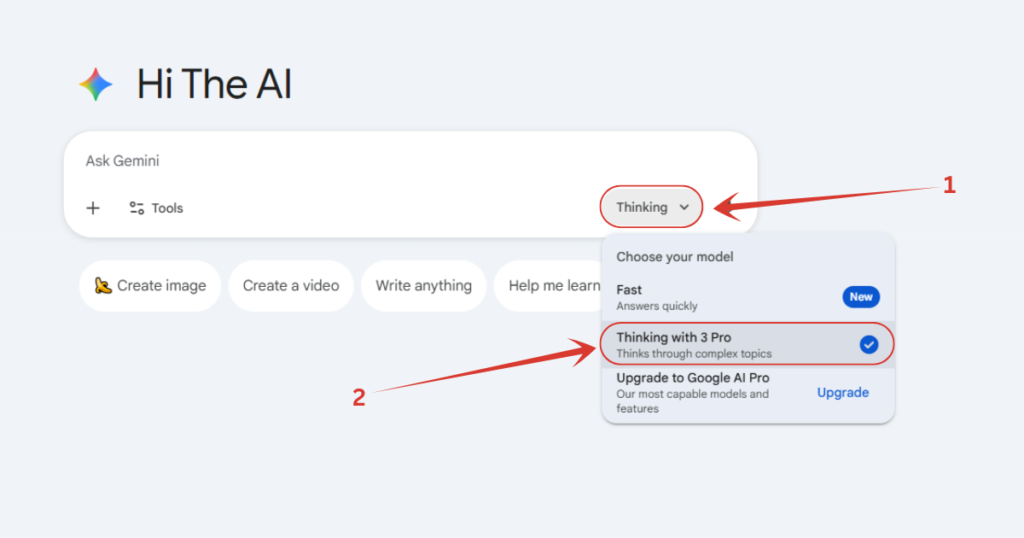
2. Make sure you have selected the Pro model of Gemini. To check whether it’s selected or not, simply click on either “Thinking” or “Fast” button down there, and if it’s set on “Fast”, switch it to “Thinking” with 3 Pro.
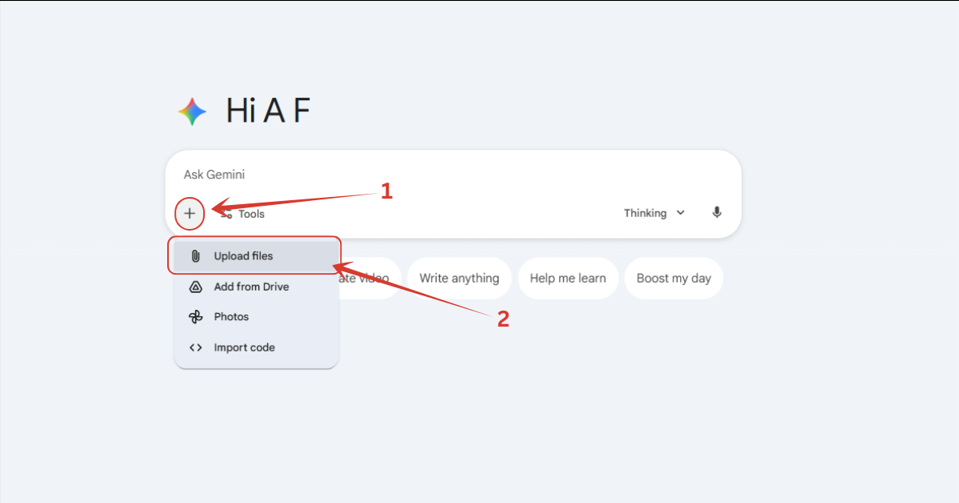
3. Now we have to upload the image of birthday boy. Click on ‘+’ button down there, and click on “Upload files” option, then a pop-up will appear from you local machine, where you have to select your image.
4. After uploading the image, pick any prompt from the above list whichever you like, enter it, wait until the image gets processed, and you are good to go.
Also Read:
How to Make Trending Selfie with Giant Marvel Heroes? Step by Step Tutorial
People Also Ask:
Color-locked couple trend is where people are generating images where they and their partner remains colorful and vibrant, while the background becomes all black and white, which actually looks beautiful.
It’s very simple. Go to Gemini, turn on Image Generation feature, add a photo where you and your partner are clearly visible, pick and paste any prompt you like from the list shown in this tutorial, hit enter, wait a few seconds, and you finally have your color-locked couple photo.
Any good AI image generating tool can be used to create color-locked couple image. But Nano Banana Pro should be used as it’s realism and reasoning is exceptional compared to other models.
Conclusion
Creating these color-locked couple photos is truly as simple as it looks—and now you know exactly how it’s done.
With Gemini’s Nano Banana Pro model and the ready-made prompts above, you can turn any ordinary picture of you and your partner into a vibrant, eye-catching memory that stands out from the rest.
Whether it’s for a birthday, an anniversary, or just a special moment you want to preserve creatively, this trend is an easy way to make something meaningful and visually stunning.
All you need is a clear photo, the right prompt, and a few seconds of processing.
Try a few variations, experiment with styles, and keep going until you get the perfect result.




Leave a Reply