

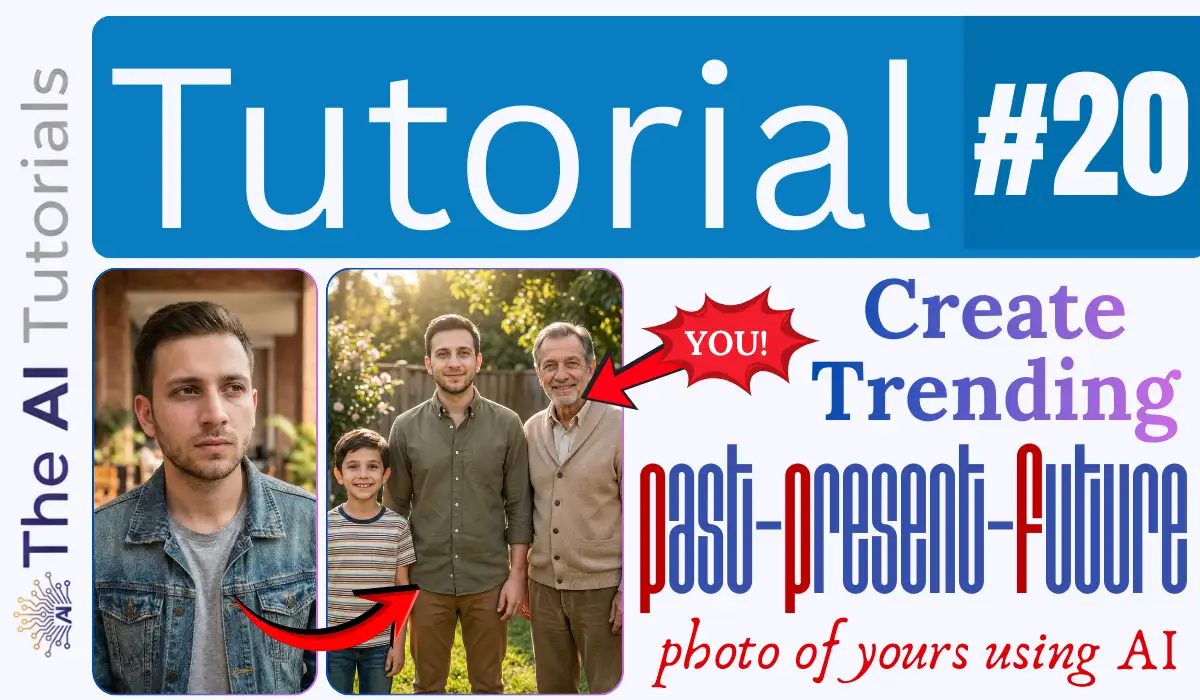
A new trend has taken place on social media, named “3 Ages Challenge”. And this seems to be great honestly as it’s not only for fun, but it truly will fulfil the wish of seeing yourself as a kid and as an old.
This trend includes a photo as an output where you along with your younger and older versions standing side by side, giving a pose to the camera, and everything looks so good and realistic as if the event has actually taken place.
Let’s see how you too can make the trending 3 Age Challenge photos of yourself.
This trick can be used to surprise your friends and family members too, but with their consent to submit their photo to an AI.
So, enough talk, lets move towards the step by step tutorial.
Key Takeaways:
- As always, will be using Nano Banana Pro through Gemini to generate this image.
- All you need to have is your photo. Prefer a good quality and closeup photo so AI can read the facial expressions and other crucial things on your body parts which will later help it to generate your younger and older version.
- The prompt to generate 3 Age Challenge will be provided in this tutorial in between.
- If you are not comfortable or do not want to use Nano Banana Pro / Gemini for this, you can use any good AI image generating tool like Dall E, Midjourney or Ideogram.
Step by Step Tutorial:
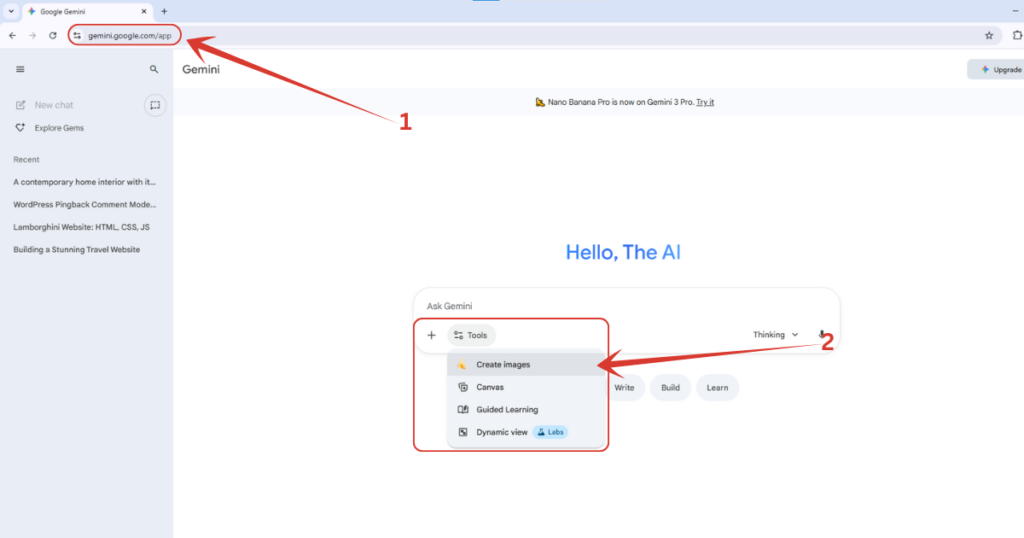
1. Let’s first move to https://gemini.google.com, then will click on “Tools” button, and select “Create images” option. By the way, if you want to claim Gemini Pro for 18 months, all for free, read this tutorial where I have explained it step by step.
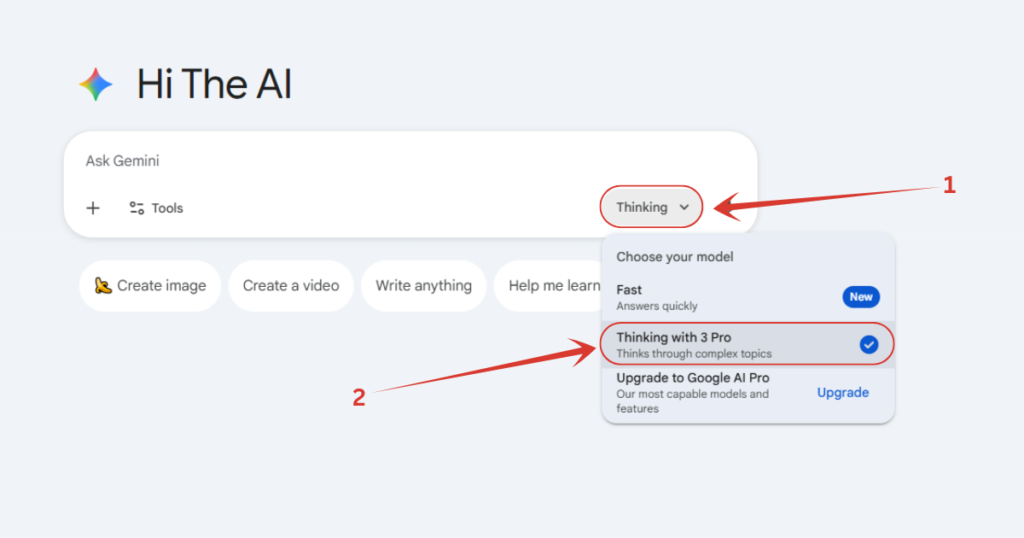
2. Make sure you have selected the Pro model. To check so, click on either “Thinking” or “Fast” button down there, and if it’s set on “Fast”, switch it to “Thinking with 3 Pro”.
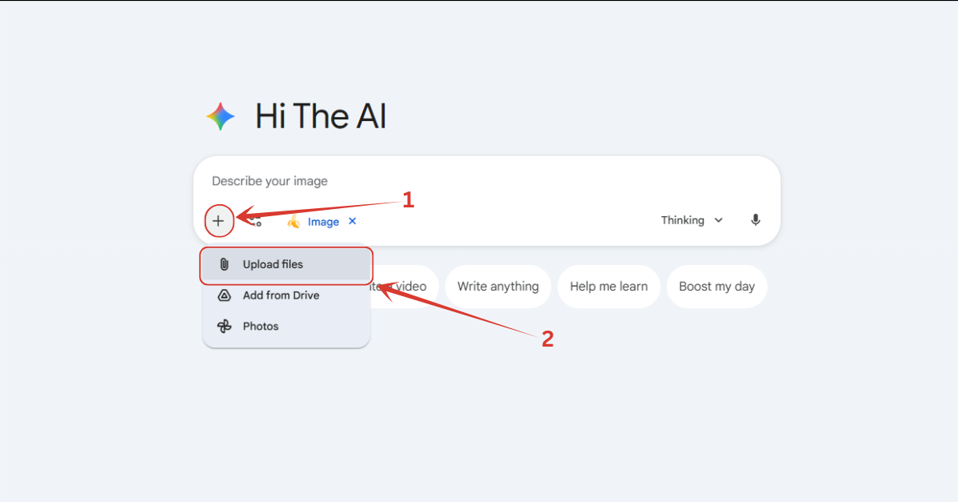
3. Then we will click on this ‘+’ icon, and then on “Upload files” button, and will upload the image.
4. This is my uploaded image, and this photo too is generated using Nano Banana Pro. After uploading the photo, copy and paste the below prompt.
The Prompt:
Using the uploaded photo only as a facial reference, create a hyper-realistic composite image titled ‘Past–Present–Future’ that shows three versions of the same person standing side-by-side: a child version (7–10 years old), the present adult version, and an older version (60–70 years old). Maintain strong identity continuity—similar bone structure, eye shape, nose, lips, jawline, hairline—while allowing natural variations in expression, hairstyle, and clothing so the final result feels like a brand-new photoshoot, not a copy of the original image. The child version should look youthful and playful; the adult version should look natural and emotionally expressive; the older version should show subtle, realistic aging with warm character. All three should smile gently or naturally, not replicate the original photo’s expression. Ensure ultra-realistic aging and de-aging without losing identity.
Place all three versions in a new, visually pleasing environment such as a backyard, park, porch, garden, home exterior, or any natural, warm outdoor scene. Use consistent lighting, camera angle, shadows, and color tones so the trio looks genuinely photographed together in this new location. Give each version age-appropriate, natural-looking clothing that suits the scene and compliments the person’s style, but does not match the outfit from the reference photo. Avoid copying the original background, pose, outfit, or lighting. Produce one final, high-quality, realistic composite image showing child on the left, present in the center, and older on the right, all appearing as if captured in a real, beautifully staged moment.

5. And we are done. Here is our generated image. You or me, along with the younger and older versions. By the way, the prompt can be customized according to your taste and requirements, so feel free to edit it so it can fit into your need-window.

Also Read:
How to Create Instagram Trending AI Photos – Step by Step TutorialHow to Make Capsule-Style Ads using AI? Step by Step Tutorial
People Also Ask:
3 Age Challenge trend is where people are making their older and younger versions all in one photo, and sharing on social media.
Simply to go Gemini, attach your photo, copy and paste the prompt provided in our tutorial, and wait for seconds. You will have your photo in which there will be a present you, past you, and a future you.
ChatGPT’s image model, Ideogram, Midjourney and Nano Banana Pro are very good tools where you can generate your past, present and future photos just by giving it your present image.
You can find the prompt in our step by step tutorial of how to make 3 Age Challenge photo, as it’s way too lengthier than the limit to answer here.
Conclusion
The 3 Ages Challenge is a fun and heart-warming way to see yourself across different stages of life—all in one beautifully crafted photo.
With just a single picture and a good AI tool, you can create a realistic child, adult, and older version of yourself standing together as if it actually happened.
The steps are easy to follow, the prompt does most of the heavy lifting, and you can customize everything to match your personal style or vision.
Whether you’re doing it for fun, for social media, or to surprise someone you love (with their permission, of course), this trend is a great reminder of how creative and magical AI tools can be.
So go ahead, try it out, experiment with different prompts, and enjoy seeing your past, present, and future selves come to life in one frame.




Leave a Reply